Phantom wallet logo representing a browser interface for signing Solana transactions

Solana Wallet Security: How the Phantom Browser Extension Works

What if the most important security decision in a Solana wallet happens before you send a single token? For many users, it is the moment they install a browser extension. A wallet such as Phantom is not simply a digital container for coins; it is an interface that connects a browser to blockchain applications, displays transaction requests, and controls access to cryptographic keys. That makes convenience valuable, but it also creates a boundary between your computer, the websites you visit, and your assets.

This distinction matters because blockchains do not reverse mistakes in the way a bank may investigate an unauthorized payment. If a user approves a malicious transaction or reveals a recovery phrase, the technical rules of the network may work exactly as designed while the financial outcome is still disastrous. The practical goal, therefore, is not to make a Solana wallet risk-free. It is to understand where risk enters, reduce the number of decisions made under pressure, and verify what the wallet is actually asking you to authorize.

Phantom wallet logo representing a browser interface for signing Solana transactions

What a Phantom extension actually does

A browser wallet performs three related jobs. First, it creates or imports wallet accounts and manages the keys that can authorize transactions. Second, it provides a user interface for balances, token accounts, collectibles, and activity. Third, it allows decentralized applications, often called dapps, to request actions such as connecting an address, signing a message, swapping tokens, or submitting a transaction to the Solana network.

The wallet does not “hold” SOL in the same way a physical wallet holds cash. Your assets are recorded on the Solana blockchain, while the private key is the credential used to sign instructions affecting those assets. This is a useful mental model: Phantom is closer to a key manager and transaction control panel than to a bank account. Losing access to the key can mean losing access to the funds, while giving the key or recovery phrase to another person can give that person the ability to move them.

When installing the extension, use the project’s recognized distribution path rather than a sponsored search result, a message from an unknown account, or a download page that imitates a familiar brand. Readers who want a starting point for the phantom extension download should still verify the domain, browser listing, and publisher details before entering any recovery information. The link itself is not a substitute for verification: phishing pages can copy logos, colors, wording, and even the visual rhythm of a legitimate wallet.

Recent project information describes Phantom as supporting Solana, Ethereum, Bitcoin, Base, and Sui, with versions available for Chrome, Brave, Firefox, iOS, and Android. That wider reach is useful for people who use several networks, but it introduces an important boundary condition. A wallet interface can support multiple chains without making every asset or application interchangeable. Network selection, token standards, transaction formats, and dapp behavior still differ. Sending an asset on the wrong network, or approving an action in an unfamiliar ecosystem, can create a problem the wallet cannot automatically repair.

The real attack surface is larger than the extension

People often ask whether a browser wallet is secure, as though security were a property that could be switched on or off. A better question is: secure against which failure? The extension may protect a private key behind a password on a particular device, yet a compromised computer, malicious browser extension, fake dapp, exposed recovery phrase, or hurried approval can bypass the user’s practical defenses.

Consider a common connection flow. A decentralized application asks to connect to a wallet. Connecting generally exposes a public address and does not, by itself, authorize a transfer. But the user may then receive a message-signing request or a transaction request. These are different events. A message can be used for authentication, while a transaction can change on-chain state or move value. The visual similarity between prompts is a risk because users may approve them by habit rather than by meaning.

On Solana, a transaction can contain several instructions bundled together. One instruction might interact with a program, another might create or modify an account, and another might transfer tokens. The wallet can show human-readable summaries, but the underlying request may still be difficult for a non-specialist to interpret. This is why a familiar website is not enough evidence of safety. A legitimate-looking dapp can be compromised, and a malicious site can request an action that appears routine.

One non-obvious distinction is the difference between a transaction and a permission that remains relevant after the transaction. Some token-related interactions can create ongoing spending authority or other account relationships. In such cases, disconnecting a dapp from the wallet interface may not be equivalent to revoking every on-chain permission previously granted. Users should treat connection management and authorization management as separate tasks, especially after experimenting with unfamiliar applications.

A practical risk-management routine

The strongest wallet habit is not technical sophistication; it is deliberate separation of activities. A wallet used for long-term savings should not necessarily be the same wallet used to test a new mint, claim an incentive, or interact with an experimental application. A separate “hot” wallet can limit the amount exposed during routine browsing, while a more carefully protected wallet can hold funds that are not needed for daily activity. This does not eliminate risk, but it can reduce the damage from one bad approval.

Before approving a request, pause at four points:

  • Identity: Did you reach the application through a trusted route, and does the domain match exactly?
  • Purpose: Are you connecting, signing a message, swapping, transferring, or granting authority?
  • Destination: Do the recipient address, token, amount, and network match your intention?
  • Persistence: Could this action create a permission or account relationship that matters later?

This checklist is intentionally slower than clicking through a promotion. Speed is not a security feature when the irreversible step is only one confirmation away. For higher-value transactions, compare the destination address through an independent channel and send a small test amount when the situation allows it. Be cautious with copied addresses: malware can alter clipboard contents, and a visually similar address is not the same address.

The recovery phrase deserves a separate rule: it should never be entered into a website, shared with support, pasted into a chat, or stored in an ordinary cloud note. Anyone who obtains it may be able to reconstruct the wallet elsewhere. A password protects access to the wallet on a device; it does not replace the recovery phrase, and it does not make the phrase safe to disclose. If a website claims that a phrase is required to “synchronize,” “validate,” or “unlock” an account, that is a major warning sign.

Browser hygiene matters as well. Keep the operating system and browser updated, remove extensions you no longer need, and avoid installing wallet software on a device shared with unknown users. A wallet extension inherits some of the risks of its environment. A strong cryptographic design cannot fully protect a device that is recording keystrokes, changing copied addresses, or displaying deceptive prompts.

What the wallet can and cannot tell you

A wallet is good at enforcing signatures: it can ask whether the authorized key should approve a request. It is less capable of answering the broader human question, “Is this a good idea?” Transaction previews may identify programs, accounts, and amounts, but interpretation can remain uncertain when applications use unfamiliar contracts, compressed instructions, or rapidly changing interfaces. Users should not confuse a clear-looking confirmation screen with a guarantee that the underlying application is honest.

There is also a trade-off between visibility and usability. Showing every technical instruction could help advanced users audit a transaction, but it could overwhelm newcomers and encourage them to approve everything without reading. Simplified summaries improve accessibility while potentially hiding context. The safest approach is conditional: use ordinary flows for familiar, low-value actions, and seek more information or use a separate wallet when the request is unusual, high-value, or difficult to explain in plain language.

For US users, operational records add another layer of responsibility. Wallet activity can involve purchases, swaps, rewards, transfers, and other events that may have tax or reporting implications depending on the facts and applicable rules. A wallet history is not automatically a complete tax record, so retaining transaction details and understanding the purpose of each transfer can be useful. This is an administrative consideration, not a reason to assume that a wallet provider determines a user’s tax obligations.

What to watch as wallets become broader

The recent expansion of Phantom availability across several networks and device types points to a practical trend: users increasingly want one interface for more of their digital assets. If that trend continues, the central security challenge may shift from “How do I install a wallet?” to “How do I maintain accurate mental context across networks?” Clear network labels, better transaction explanations, and more visible permission controls would reduce that burden, but users should not assume that interface improvements remove the need for verification.

A reasonable near-term scenario is that wallet security will depend increasingly on the quality of transaction interpretation, not just on key storage. If applications and wallets can make destinations, permissions, and irreversible effects easier to understand, careful users may make fewer mistakes. If convenience features hide more of the underlying action, the opposite could happen. The evidence a user can watch for is concrete: clearer prompts, explicit warnings for unusual permissions, reliable revocation tools, and consistent behavior across supported chains.

The most useful takeaway is a change in perspective. Installing a Phantom browser extension is only the first step in managing a Solana wallet. The durable skill is learning to distinguish custody from interface, connection from authorization, and a readable prompt from a trustworthy transaction. Once those distinctions become routine, the wallet becomes more than a button for sending SOL: it becomes a controlled gateway whose risks can be examined before they become expensive.

Frequently asked questions

Is a Phantom browser extension the same as a bank account?

No. A bank typically provides institutional custody and may offer fraud investigation or reversal processes. A browser wallet gives the user control over cryptographic credentials used to authorize blockchain actions. That control can be empowering, but it also transfers more responsibility for backups, device security, and transaction verification to the user.

Can disconnecting a dapp make my wallet safe again?

Disconnecting can stop an application from using the wallet connection in the usual interface, but it should not be assumed to undo every authorization or on-chain relationship already created. If you approved a suspicious action, review the relevant account activity and permissions using appropriate tools, and move remaining assets to a clean wallet when the risk warrants it.

What should I do if a site asks for my recovery phrase?

Stop. Do not enter or share it. A legitimate support representative, dapp, or wallet interface should not need your recovery phrase to verify a transaction. Treat the request as a likely phishing attempt and leave the site without approving further prompts.

Diagram illustrating how a Safe smart contract wallet coordinates multiple signers before a DAO treasury transaction executes

Safe Wallet, DAO Treasury, Gnosis Safe: What a Multisig Actually Protects

What if the biggest risk in a DAO treasury is not a stolen private key, but a perfectly valid transaction approved by the wrong people? That question changes how a multisignature wallet should be evaluated. A Safe wallet, formerly associated with the Gnosis Safe name, can require several authorized signers before a treasury transaction executes. But the contract does not decide whether a proposal is wise, whether a signer is independent, or whether the organization’s rules are clear.

This distinction matters for US-based users and DAOs managing stablecoins, governance tokens, operating funds, or on-chain investments. A multisig is best understood as a programmable control layer: it reduces dependence on one key, while moving more responsibility into signer selection, transaction review, operational procedures, and smart-contract configuration. The technology can make failure harder, but it cannot make governance unnecessary.

Diagram illustrating how a Safe smart contract wallet coordinates multiple signers before a DAO treasury transaction executes

Myth One: A Multisig Is Just Several Wallets Sharing One Balance

That description is intuitive, but inaccurate. A conventional externally owned account is controlled by a private key: a valid signature from that key authorizes an action. A Safe is a smart contract wallet. Its contract stores rules about owners, the approval threshold, and the transactions that can be executed. The balance belongs to the contract address, and the contract checks whether the required approvals exist before allowing execution.

In a “2-of-3” arrangement, for example, any two of three designated owners may need to approve a transaction. The important mechanism is not that three people log into a shared account. Each signer controls a separate account and submits a cryptographic approval. The Safe contract then verifies the approvals against its current configuration. This creates separation between holding assets and authorizing movement of those assets.

That separation is useful because compromise of one signer does not automatically equal compromise of the treasury. It also creates a different failure mode: if enough signers lose access, become unavailable, collude, or approve a malicious transaction, the threshold can still be satisfied. Security is therefore not a single number. It is a relationship among the threshold, the number and quality of owners, the assets at risk, and the organization’s ability to respond.

Readers who want a practical orientation to the product and its terminology can review this safe wallet gnosis safe overview, then verify current interface and network details directly before moving funds. Wallet interfaces change, and a familiar display should never substitute for checking the destination address, chain, token, and transaction data.

Myth Two: More Signers Always Mean More Security

More signers can improve resilience, but only if they add meaningful independence. A five-person treasury in which four devices are controlled by one operator is not equivalent to five genuinely separate administrators. Likewise, a 4-of-5 threshold may provide strong protection against unilateral action but create a serious availability problem if two signers are traveling, offline, or unable to recover their accounts.

This is a classic security trade-off between integrity and availability. A higher threshold makes unauthorized execution more difficult, yet it also increases the chance that legitimate execution stalls. A lower threshold makes routine payments easier, but leaves the treasury more exposed to compromise or poor judgment by a small group. There is no universally correct ratio. A DAO should choose based on its operating reality, not on the appearance of mathematical sophistication.

A useful design exercise is to ask four questions. How many independent failures should the treasury survive? How quickly must it make an emergency payment? Which transactions deserve extra scrutiny? And who can change the signer set or threshold? The last question is frequently overlooked. If one actor can reconfigure ownership, the apparent protection of the transaction threshold may be weaker than it seems.

Signer independence also has a human dimension. Owners should ideally use separate devices, secure authentication practices, and distinct recovery procedures. They should understand what they are approving rather than treating a wallet prompt as a routine “yes” button. In a DAO, geographic and organizational diversity may reduce correlated failures, but it can also make coordination slower. Good governance accepts that friction is sometimes the cost of preventing impulsive or covert transfers.

Myth Three: The Wallet Replaces Governance

A Safe can enforce an approval rule, but it does not establish what the rule should be. A DAO still needs a treasury policy: spending limits, approved counterparties, budgeting authority, emergency procedures, signer replacement rules, and a process for recording why a transaction was approved. On-chain enforcement and off-chain governance are complementary, not interchangeable.

This is where a sharper mental model helps. Treat the wallet as the “last mile” of authorization. A proposal may begin in a forum, a voting system, a messaging channel, or an internal operating process. The Safe is where selected signers confirm and execute the resulting transaction. If the earlier stages are vague, the wallet may faithfully execute an ambiguous decision. Technical validity is not the same as institutional legitimacy.

For example, a transaction can have the correct number of signatures and still send funds to a wrong address, interact with an unsafe contract, or approve a token allowance that is broader than intended. Signers need to inspect the actual operation, not merely the label presented by a user interface. When a transaction involves a contract call, the meaningful question is often not “How much is being sent?” but “What permission is this contract receiving, and for how long?”

Smart-contract wallets can support more advanced controls, including transaction policies and integrations, but additional functionality expands the review surface. Modules, automation, delegated permissions, and recovery features may be useful in carefully designed systems; they may also introduce new code and configuration dependencies. The principle is simple: every added control mechanism should have an owner, a purpose, a review process, and a way to disable or replace it.

What a DAO Treasury Should Decide Before Funding the Wallet

The first decision is asset segregation. Operational funds, long-term reserves, grants, payroll, and speculative positions do not necessarily belong in the same Safe or under the same threshold. Separating them can limit blast radius. A compromised operational wallet should not automatically expose the organization’s entire reserve, while a highly restrictive reserve wallet should not become a bottleneck for ordinary expenses.

The second decision is transaction review. Signers should agree on a minimum verification standard before a proposal reaches the threshold. That may include confirming the chain, recipient, amount, token, contract address, calldata, and purpose through an independent channel. For large or unusual transfers, a time delay or an additional review group can create space to detect social engineering. The delay is not free: markets move and urgent obligations arise. But speed is not always a security virtue.

The third decision is recovery. What happens if a signer loses a device? What if a signer leaves the DAO? What if the organization suspects a key is compromised but cannot reach everyone? A recovery plan should be tested while the system is healthy. In practice, a procedure that exists only in a document may fail under pressure, especially when signers are distributed across time zones or are volunteers with competing responsibilities.

Finally, document authority. A US DAO may face accounting, tax, contractual, or regulatory questions that are not answered by wallet software. The wallet can show what happened on-chain, but it may not explain who had authority under the organization’s legal or operational arrangements. Treasury records should connect executed transactions with proposals, budgets, approvals, and any relevant professional advice. That separation between technical evidence and legal interpretation is important; one should not be presented as a substitute for the other.

Where the Safe Model Breaks Down

The most important limitation is that multisignature security is partly a social system. Phishing can persuade multiple signers. Coordinated insiders can satisfy the threshold. A malicious proposal can be framed as routine. A signer may approve a transaction after checking the amount but not the destination or contract permission. These are not failures that cryptography alone can solve.

There are also infrastructure dependencies. Signers rely on interfaces, RPC providers, chain availability, hardware or software wallets, and accurate transaction decoding. A mismatch between what an interface displays and what a contract call does can create dangerous ambiguity. This does not mean every integration is unsafe; it means a DAO should define which information is authoritative and how unusual transactions are escalated.

Another boundary condition is emergency action. A treasury designed only for deliberative governance may be too slow during a rapidly developing exploit. A treasury designed for instant intervention may give too much power to a small emergency group. A conditional emergency path—with narrow scope, explicit limits, and later review—can be a reasonable compromise, but it must be tested and understood before it is needed.

The practical takeaway is to judge a Safe configuration by its failure tolerance rather than its feature list. Ask what happens after one compromised key, one unavailable signer, one mistaken approval, one disputed proposal, and one need to change the ownership set. If the answers are unclear, the DAO does not yet have a treasury policy; it has a wallet address with hopes attached.

FAQ: Safe Wallets and DAO Treasuries

Is a Safe wallet custodial?

A Safe is generally used as a self-managed smart contract wallet: the organization’s chosen owners authorize transactions rather than a traditional custodian holding the keys. That does not eliminate responsibility. Owners control access, and the DAO must manage signer changes, recovery, transaction review, and records.

What threshold should a DAO choose?

There is no universal best threshold. Choose one that balances resistance to unilateral compromise with the ability to execute legitimate transactions. Consider signer independence, treasury size, payment urgency, availability, and the process for replacing a signer. A threshold that cannot operate in real conditions is not a strong security design.

Does a multisig prevent all treasury hacks?

No. It reduces certain single-key risks, but it cannot prevent collusion, social engineering, unsafe contract interactions, compromised devices, or poor governance. Its protection is strongest when paired with independent signers, careful transaction verification, asset segregation, and rehearsed recovery procedures.

The durable lesson is less glamorous than “put the treasury behind a multisig,” but more useful: a Safe converts a governance rule into executable code, and that code is only as trustworthy as the rule, the signers, and the review process surrounding it. For a DAO, security is not achieved when the wallet is deployed. It is maintained each time people decide what the wallet is allowed to do.

Diagram showing how a hardware wallet isolates private keys from internet-connected devices to sign bitcoin transactions.

When “100% Offline” Isn’t a Magic Spell: How Bitcoin Hardware Wallets Actually Protect Your Keys

Imagine you wake up to a news alert: a major exchange suffered a coordinated breach and millions of dollars in crypto were drained. You feel a squeeze in your chest, then relief—your holdings are on a hardware wallet tucked in a drawer. That visceral contrast captures why many U.S. crypto holders judge hardware wallets as the practical spine of self-custody. But “offline” and “secure” are not identical, and the real protective value of a hardware wallet comes from specific mechanisms and the human choices that surround them.

This explainer unpacks how bitcoin hardware wallets work, why they materially reduce several classes of risk, where they still fail, and how to choose and operate one so you don’t trade illusion for safety. I’ll correct common myths, reveal limits that users often miss, and end with a practical, decision-ready checklist you can apply today.

Diagram showing how a hardware wallet isolates private keys from internet-connected devices to sign bitcoin transactions.

Mechanism: What a hardware wallet actually does

At its essence, a hardware wallet is a small, purpose-built device that stores private keys and performs cryptographic signing inside an isolated environment. When you want to spend bitcoin, your wallet constructs a transaction on your phone or computer, sends it to the hardware device, the device signs it internally with the private key, and then returns the signed transaction to the host for broadcast. The private key never leaves the device in plaintext.

This isolation matters because many threats—malware, remote attackers, credential phishing—require access to either the key material or the host that controls it. By keeping keys in a tamper-resistant element and limiting the device’s I/O to a minimal, audited channel, hardware wallets sharply reduce attack surface. Recent project messaging emphasizes that with the Trezor hardware wallet your crypto stays “100% offline,” highlighting that your keys remain outside internet reach; that phrasing captures the intended boundary between custody and online exposure.

Common myths vs reality

Myth: A hardware wallet makes you invulnerable. Reality: It mitigates certain technical attacks but transfers responsibility to user procedures. For example, if you back up a seed phrase on an unencrypted cloud note, or photograph it, the backup becomes the weakest link. Physical theft of the device is only a problem if the thief also obtains your PIN or seed backup. Supply-chain attacks—where a device is tampered with before you receive it—are rare but real.

Myth: All hardware wallets offer the same level of protection. Reality: Designs differ by secure-element architecture, firmware update model, and how they handle recovery seeds and passphrases. Some devices prioritize auditability and open-source firmware; others emphasize a certified secure element which will not release keys even under firmware compromise. The trade-offs matter for threat models: do you fear remote malware, targeted physical attacks, or coerced disclosure?

Where hardware wallets break: limitations and user failures

There are three dominant failure modes to keep visible: human operational error, supply-chain or delivery compromise, and sophisticated local attacks.

Human operational error is the most common. The backup (seed phrase) is necessary to recover funds; if mishandled—stored in plain sight, in cloud backups, or shared—the hardware wallet provides little additional safety. A practical rule: the device secures keys; the user secures the backups. If either is exposed, the whole system fails.

Supply-chain compromise can be mitigated by buying from reputable vendors or verifying the device’s integrity at first use, but verification can be subtle. Some wallets include tamper-evident packaging and startup checks; others expect you to verify firmware signatures. Defending against supply-chain risks costs time and some technical attention.

Local attacks—like hardware side‑channel analysis or cold-boot style extraction—are expensive and typically aimed at high-value targets. Hardware wallets are designed to make such attacks technically and economically impractical for ordinary thieves, but no device is perfectly immune to a well-funded, determined attacker.

Decision framework: Which wallet and why

Rather than a single “best” choice, pick a wallet that matches your threat model. Use this three-question heuristic:

1) What is the value at risk? For modest balances, convenience and user experience may rightly dominate. For six-figure holdings, favor devices with explicit tamper-resistance, stronger hardware roots-of-trust, and a robust firmware signing policy.

2) What attack vectors worry you most? If you fear remote malware, prioritize strong isolation and a clean host workflow. If you fear coercion or theft, combine a passphrase (BIP39 passphrase or “hidden wallet”) with geographically separated backups. If you worry about vendor compromise, prefer open-source firmware and reproducible build processes.

3) How will you handle backups and recovery? The device only reduces risk when your recovery process is resilient: use durable physical backups (metal seed storage is now common), consider multi-party custody for very large holdings, and avoid cloud or phone backups for seeds.

For readers who want manufacturer-level resources and setup guidance, consult the manufacturer’s official documentation such as the trezor official pages for device-specific onboarding and firmware procedures.

Operational best practices (practical checklist)

– Buy from a trusted retailer or directly from the manufacturer to reduce supply-chain risk. Unopened packaging is not a guarantee; verify device integrity during initial setup.

– Use a strong, unique PIN and enable additional passphrase features if you understand their recovery implications. Passphrases create hidden wallets but add complexity to recovery—document your approach carefully.

– Record your recovery seed on non-digital, durable media. Metal plates or stamped storage resist fire, water, and accidental damage better than paper.

– Keep backups geographically separated and consider a split-seed or multisig approach for very large holdings to avoid single-point failures.

– Update firmware only from authenticated sources and understand what an update changes. Read release notes and prefer transparent, auditable projects when possible.

– Practice a recovery drill in a low-stakes account so you can perform seed recovery reliably under stress.

Trade-offs and unresolved questions

Hardware wallets trade convenience for control. They add steps—PINs, seed safekeeping, manual transactions—that reduce remote attack risk but increase operational risk from human error. Multisignature arrangements reduce single-device compromise risk yet raise complexity and cost. There’s no free lunch: improved security almost always costs something in time, money, or cognitive overhead.

Open questions in the field include better usability for secure backups (how to make metal backups mainstream and simple), standardization for supply-chain verification, and defenses against future classes of attack like quantum computing. These are active research and engineering areas; practical implications today should be judged by whether a vendor shows attention to firmware verification, transparent update practices, and clear user guidance.

FAQ

Q: If my hardware wallet is “offline,” can malware on my computer still steal my bitcoin?

A: Not directly. Malware on your computer can try to trick you into signing bad transactions or phish your seed only if you reveal it. The hardware device prevents raw key exfiltration, but user actions (approving an incorrect transaction, entering seed into a compromised machine) can defeat that protection. Think of the wallet as minimizing technical exposure while requiring disciplined user behavior.

Q: Is a hardware wallet necessary for every bitcoin holder in the U.S.?

A: “Necessary” depends on your risk tolerance and custody philosophy. If you prioritize full self-custody and will hold meaningful value long-term, a hardware wallet is a strong defensive step. If you rely on brokerage or exchange custody, you accept counterparty risk instead. Know the trade-offs: convenience and service-level protections versus direct control and responsibility.

Q: What should I do if I lose my hardware wallet?

A: Use your recovery seed to restore funds to a new device or software wallet. That’s why secure, off-line storage of the seed is crucial. If you never made a backup, the funds are likely unrecoverable—hardware wallets do not have backdoors or vendor recovery.

Q: How worried should I be about supply-chain tampering?

A: For most users, buying from official channels and verifying the device at first boot is sufficient. High-value users should apply stricter controls: unopened inspection, vendor provenance checks, and optionally verifying cryptographic firmware signatures. The risk exists but is much lower than everyday phishing and malware if basic precautions are followed.

Bottom line: a hardware wallet is a powerful engineering tool that enforces a boundary between your private keys and the internet. That boundary materially reduces remote and software-based threats, but it is not an automatic cure. Effective security depends on layered defenses: device integrity, careful backups, informed firmware management, and disciplined operational habits. With those in place, hardware wallets move you from fragile custody to an accountable, survivable approach to holding bitcoin—one that makes theft expensive, detectable, and avoidable for most holders.

Claude's desktop integration: favicon icon representing web-to-desktop connection and automation features

Myth: “The desktop Claude is just a prettier web wrapper” — what the Claude app actually does on macOS and Windows

It’s common to hear that desktop apps for large language models are nothing more than browser windows wrapped in an executable. That’s a useful shorthand — sometimes true — but with Claude the reality is more nuanced. The Anthropic Claude desktop client for macOS and Windows is a set of integration patterns and runtime choices that change how you work with context, files, privacy settings, and browser automation. Understanding those mechanisms will help you choose whether to install the app, how to manage risks, and where the tool is likely to help most in day-to-day productivity.

This piece corrects the misconception by unpacking what a desktop Claude actually brings: a conversation-first UX, richer file and context workflows, local connectors (including a Chrome automation connector announced recently), cross-device sync, and enterprise management hooks — and it explains the trade-offs those elements introduce for individual users and IT teams in the US.

Claude's desktop integration: favicon icon representing web-to-desktop connection and automation features

How Claude’s desktop client works, in mechanism-first terms

Start with the architecture. A “desktop app” can mean several things technically: a native application with its own UI thread and system integrations; an Electron or similar wrapper that hosts a web view; or a small native shell that manages network access, local caching, and OS-level permissions for a web-based interface. Claude’s desktop distribution is presented as a platform-specific installer for macOS and Windows and is designed to sync conversations, memory, and preferences with Anthropic’s cloud services when you sign in. That synchronization is not cosmetic — it enables workflows that span devices and persists state in ways a stateless private browser tab does not.

Mechanisms that matter:

  • File and context handling: Claude’s desktop client can accept local files and expose them to the assistant as context you can query, summarize, and reason over. The app mediates the file upload, meaning the UX for multi-file workflows and larger documents is smoother than repeatedly dragging items into a web text box.
  • Local connectors and browser automation: a recent project update notes a Chrome connector that Claude can use to navigate, click, and fill forms from the Desktop app when enabled. Concretely, that means the assistant can begin a task in your browser without you manually switching windows and copy-pasting — a productivity multiplier for repetitive workflows like form completion or data extraction.
  • Sync and memory: conversations, projects, and saved preferences are intended to follow you across desktop, web, and mobile sessions. That persistence changes how you build multi-session tasks, making long-running projects more coherent.
  • Enterprise controls: organizations can provision, restrict, or audit access through business administration paths. That’s a governance mechanism that matters to IT teams concerned with data handling and compliance.

What it actually changes for everyday productivity — and where the gains flatten out

From a user’s perspective, the desktop client often feels faster and more integrated. Dragging a local file into an app that understands file context and can chain analysis steps (summarize → extract → revise) is inherently more efficient than juggling downloads and uploads. The Chrome connector announcement is especially practical: enabling the connector allows Claude to imitate low-level browser interactions that normally require a human — clicking through a multi-step workflow, filling forms, or harvesting specific elements from pages. That reduces context switching and can shorten workflows from minutes to seconds.

But there are clear limits. The assistant still relies on server-side models for language understanding and generation, so latency and API policies are factors that a desktop wrapper cannot eliminate. The Chrome automation is powerful but brittle: web pages change, sites may introduce bot-detection, and automation privileges require careful permissioning. For sensitive workflows (medical notes, legal documents, HR data) the convenience of browser automation and file uploads must be balanced against organizational privacy rules and auditability.

Misconceptions corrected and why they matter

Misconception 1: “Desktop equals offline.” Correction: Claude’s intelligence and conversation memory sit on Anthropic’s cloud; the desktop app is a client. You gain local convenience and OS integrations, but not local model inference or guaranteed offline operation. For developers or security-minded users expecting an entirely on-device model, the desktop client won’t deliver that.

Misconception 2: “All apps handle files the same way.” Correction: the way Claude presents, ingests, and exposes files to conversations is part of its product design. Desktop file workflows reduce friction, but whether files remain encrypted locally, how they are transmitted, and what metadata is stored depends on account, plan, and organization settings. Users and admins should check those controls before exchanging sensitive material.

Misconception 3: “Automation is magic and always reliable.” Correction: browser connectors are programmatic interactions, not omniscient agents. They can speed repetitive, structured tasks, but they are sensitive to page structure, require explicit permissions, and are subject to the same web policies and CAPTCHAs as other automated tools.

Decision-useful heuristic: when to install Claude’s desktop client

Use this rule-of-thumb to decide whether a desktop client is worth installing:

  • Install if: you regularly work with local documents, need cross-session project continuity, or perform repetitive browser-based tasks that benefit from automation.
  • Skip or delay if: you require fully offline models, your organization forbids cloud processing of certain data classes, or you prefer minimal surface area for system updates and background services.

This heuristic helps you match the app’s capabilities to needs — it’s about workflow fit, not a binary “best” choice.

Trade-offs, controls, and what to configure first

Three practical trade-offs to weigh and configure:

  1. Privacy vs. convenience: enabling file uploads and the Chrome connector offers real convenience. If you handle regulated data, require enterprise controls or disable certain features until you consult IT.
  2. Speed vs. predictability: the automation connector can save time but can introduce brittle dependencies. Build small tests around your automation tasks and monitor them periodically.
  3. Local footprint vs. feature set: native features (notifications, keyboard shortcuts, OS-level drag-and-drop) improve flow. If you want the smallest footprint, use the web UI instead.

Before installing, follow safe download guidance: prefer the official download page or trusted app stores rather than third-party installers. For direct access, the official download location provides platform-specific installers and clear instructions to keep you on an authentic channel; you can find the desktop claude app there.

Where Claude fits in a broader toolstack and what to watch next

Claude’s desktop client sits alongside browser tools, mobile apps, and enterprise platforms. In a U.S. work context, it is most useful when it reduces repetitive cognitive labor — drafting, summarizing, and extracting— and when teams set explicit data governance rules. For developers, Claude’s coding workflows (explain, debug, plan) integrate well with local files and can shorten iteration cycles, but you should pair the assistant with local testing and code review rather than treat generated code as production-ready.

Signals to monitor in the near term:

  • Automation durability: track how the Chrome connector handles site changes and bot protections; successful adaptations will require both engineering and user-level permission flows.
  • Privacy controls and transparency: watch for clearer documentation on data retention, encryption, and admin controls, which will influence enterprise adoption.
  • Platform differentiation: if desktop clients add more native features (clipboard managers, deeper OS automation), the productivity delta versus web-only use will grow.

Limitations and unresolved questions

Important limitations remain. First, the desktop client is not a substitute for an on-device model. The need for cloud services means latency, region-based availability, and policy-driven feature gating can vary. Second, automation increases power and risk; accountability, logging, and change-detection mechanisms are often immature in consumer-facing connectors. Third, while conversation sync is convenient, it centralizes data — a privacy and compliance concern that organizations must actively manage.

Open questions include how automation connectors will scale across complex enterprise applications and how regulators and standards groups will treat assistants that can interact with user interfaces on behalf of users. These are active areas of product, legal, and policy development.

FAQ

Q: Is the Claude desktop app safe to download on macOS and Windows?

A: The safest route is the official download page or a trusted app store. Avoid third-party repackaged installers. Also verify your account and organization policies before uploading sensitive files—the app provides file workflows but does not automatically change enterprise data governance.

Q: Can Claude’s desktop client operate offline or run models locally?

A: No. The desktop client is a front end that communicates with Anthropic’s cloud-based models. It offers local conveniences and integrations, but model inference and conversation memory are cloud-hosted. If you need local-only processing, a different technical approach is required.

Q: What is the Chrome connector mentioned in recent updates?

A: It’s a connector that lets Claude perform browser interactions—navigating pages, clicking, and filling forms—when you enable it. It can speed repetitive web workflows, but it requires explicit permissions and can be fragile when pages change.

Q: How does the desktop client handle files and privacy?

A: Files you provide become part of the conversation context and are processed by the service according to your account and organization settings. Check your plan and admin controls for retention and access policies before submitting regulated data.

Q: Should enterprises prefer desktop installs or browser-based access?

A: It depends. Desktop installs offer better integration and automation but increase the surface area for management. Enterprises should weigh productivity gains against governance, auditing needs, and the ability to centrally manage installations and permissions.

Bottom line: the Claude desktop client is more than a visual wrapper when your work relies on files, long-running projects, or browser automation; it is less than a private, offline model. Treat the app as a workflow amplifier that brings integration and convenience — and treat governance, testing, and privacy as first-order considerations when you deploy it in personal or organizational settings. If that aligns with your needs, installing the platform-specific desktop client can be a practical productivity move; if not, the web or mobile interfaces will still deliver the core conversational capabilities without the same local footprint.

MetaMask wallet interface symbolizing browser-based control of blockchain accounts and transaction approvals

MetaMask Wallet Download: What the Browser Extension Does—and Where Its Risks Begin

You are about to claim an Ethereum airdrop, connect to a decentralized application, or move funds from a US exchange. The site asks you to “connect wallet,” and the obvious next step seems simple: download MetaMask, create an account, and approve the transaction. That sequence hides the important part. MetaMask is not merely a password manager with a fox logo; it is an interface for signing messages and transactions that blockchain networks will treat as instructions. A careless click can therefore have consequences far beyond a bad login.

The useful mental model is this: MetaMask gives you control over cryptographic keys and a way to present transactions to networks, but it does not make those transactions safe by itself. Its browser extension can connect to Ethereum and many EVM-compatible networks, display assets, and route swaps. The judgment about what to sign remains yours. Understanding that boundary is more valuable than memorizing a download button.

MetaMask wallet interface symbolizing browser-based control of blockchain accounts and transaction approvals

Start with the download, but think like a security engineer

For someone searching for a metamask wallet extension, the first practical rule is to obtain the software through MetaMask’s official distribution route or the verified extension listing for the browser being used. Search advertisements, unofficial download pages, and lookalike domains deserve suspicion because a counterfeit wallet can be designed to capture a Secret Recovery Phrase (SRP) before the user ever reaches the real interface. The extension itself should be treated as a high-value security tool, not as an ordinary browser add-on.

During setup, MetaMask generates a 12- or 24-word Secret Recovery Phrase. This phrase is the recovery root for the wallet. Whoever possesses it may be able to recreate the accounts elsewhere, regardless of the device, browser profile, or email account involved. A screenshot, cloud note, email draft, or shared password manager can create an exposure that is difficult to notice later. Store the phrase offline and never enter it into a website that claims to “verify,” “sync,” or “unlock” the wallet. MetaMask support cannot legitimately need the phrase to diagnose an account.

“Non-custodial” is another term that is often misunderstood. It means private keys are not held for you on a centralized server in the conventional wallet model. That removes one class of counterparty risk, but transfers responsibility to the user. If the SRP is lost, recovery may be impossible. If it is stolen, the fact that MetaMask is non-custodial does not provide a reversal mechanism. Self-custody is not automatically safer; it changes who controls the failure point.

What the browser extension actually controls

When a decentralized application, or dApp, requests a connection, the extension usually gives the site access to a public address and the ability to request actions. A connection is not the same as permission to spend every asset, but the distinction can disappear when a user approves a token allowance. An approval is an on-chain instruction allowing a smart contract to move a specified token amount from an account. Many interfaces request an unlimited allowance for convenience. If that contract is later compromised, upgraded maliciously, or simply deceptive, the allowance can become a path to funds being drained.

This is why a transaction should be read as a proposed state change rather than as a routine confirmation. Ask what contract is being called, which network is selected, which token is involved, and whether the approval is limited or unlimited. Revoking an allowance later can reduce risk, but revocation is itself an on-chain transaction and may require network fees. More importantly, revocation does not undo a transfer that has already occurred. The safer habit is to limit approvals where the interface allows it and periodically review permissions for accounts that interact with many dApps.

MetaMask’s asset display can also create a false sense of completeness. Automatic token detection can identify and display supported ERC-20-equivalent tokens across networks such as Ethereum, Polygon, and BNB Smart Chain. That is convenient, but visibility is not authentication. A token can appear in a wallet without being the legitimate asset a user expects, and a familiar symbol can be copied by unrelated contracts. For a custom token, verify the contract address through a trusted project source or block explorer before importing it. Manual import generally requires the contract address, symbol, and decimal count; it does not prove that the token is valuable or safe.

MetaMask across Ethereum and beyond

MetaMask is strongly associated with Ethereum because its original strength is interaction with Ethereum Virtual Machine networks. It supports environments including Ethereum Mainnet, Linea, Optimism, BNB Chain, Polygon, zkSync, Base, Arbitrum, and Avalanche. These networks may share compatible account structures, but they do not share the same fee market, transaction history, bridge assumptions, or security model. Seeing the same address on several networks does not mean an asset on one network can be spent on another without an appropriate bridge or exchange process.

The expansion toward Bitcoin and Solana changes the user experience but not the need for network literacy. Different chains can require different address formats, signing behavior, and application assumptions. MetaMask Snaps provides an extensibility framework through which developers can add functions and support for non-EVM networks inside the wallet interface. That is an important architectural development, yet extensibility creates a review question: users must evaluate not only the wallet, but also the additional software components they install and the permissions those components request.

There are also specific boundaries. Current knowledge indicates that Ledger Solana accounts or private keys cannot be imported directly for Solana through MetaMask, and custom Solana RPC URLs are not natively supported in the same way some advanced users may expect. Solana-focused users may therefore find Phantom more natural, while Trust Wallet emphasizes broad multi-chain access and Coinbase Wallet may appeal to users who prioritize exchange integration. The best choice depends on the chains and workflows involved, not on a universal ranking of wallets.

How MetaMask Swap works—and why the displayed price is not the whole price

MetaMask Swap is designed to aggregate quotes from decentralized exchanges and route a trade using considerations such as slippage and gas optimization. In mechanism terms, the wallet is helping select and submit a path through available liquidity rather than acting as a magic exchange that creates liquidity itself. The quoted output depends on pool depth, network congestion, the selected route, fees, and the size of the trade relative to available liquidity.

Slippage is the difference between the expected execution price and the actual price received. A low slippage tolerance can protect a trader from accepting a materially worse result, but it can also cause a transaction to fail when markets move quickly or liquidity is thin. A high tolerance increases the chance of execution while giving the trade more room to settle at an unfavorable price. Gas optimization can reduce network costs, but the cheapest route is not necessarily the simplest or least exposed to smart-contract risk. A trader should compare the final received amount, network fee, price impact, and any displayed service charge rather than focusing only on the headline quote.

The common myth is that a wallet swap is automatically safer than using a decentralized exchange directly. The more accurate claim is narrower: aggregation may improve convenience and sometimes execution by comparing routes, but it still depends on the contracts, liquidity venues, token behavior, and transaction parameters involved. A token with transfer restrictions, unusual tax logic, or shallow liquidity can behave badly even when the wallet presents a polished interface.

New convenience features do not remove old responsibilities

MetaMask supports Smart Accounts and account-abstraction features. Account abstraction is a broad design approach that can make an account behave more like programmable software than a simple key-controlled address. In practice, features may include sponsored fees, sometimes described as gasless transactions, and batching several actions into one transaction. These capabilities can make onboarding and routine DeFi activity less awkward, especially for users who do not yet hold the network’s native token for gas.

But “gasless” does not mean costless or riskless. A sponsor still pays the network fee, and the service may impose conditions, limits, or eligibility rules. Batching can improve usability while making the overall action harder for a beginner to inspect because several state changes appear together. The relevant question is not whether a feature sounds simpler; it is whether the user can understand who pays, which permissions are granted, and what happens if one part of the sequence fails.

An experimental Multichain API points toward a future in which applications may interact with several networks without requiring the user to switch manually each time. If that approach becomes reliable, it could reduce one of the most common operational errors: sending an asset or signing a transaction while the wrong network is selected. The unresolved issue is whether hiding network complexity improves safety or merely hides important context. Convenience will be beneficial only if the interface makes chain, fee, asset, and destination information more visible—not less.

A practical framework for US Ethereum users

Before downloading, decide what job the wallet must perform. A small amount used for testing a new dApp has a different risk profile from long-term savings. A hardware wallet such as Ledger or Trezor can keep signing keys in cold storage while allowing MetaMask to serve as the transaction interface. This arrangement reduces exposure of the keys to the everyday computer, although it does not prevent a user from approving a malicious transaction on the hardware device. Hardware protection is strongest when paired with careful transaction review.

For ordinary browser use, separate accounts by purpose when practical: one for experimentation, one for routine transfers, and one connected to higher-value holdings or hardware security. Use a test transaction when the destination is unfamiliar. Confirm the first and last characters of an address, but do not rely on that alone; address-poisoning schemes can exploit superficial visual checks. Keep browser extensions to a minimum, update the operating system and browser, and avoid signing transactions while using a computer that may be shared or infected.

Recent MetaMask messaging has presented a broader product vision involving buying and selling Bitcoin, Ethereum, and Solana, a money-account concept, global transfers, and a card with possible rewards. Those developments, as described in the weekly project update, suggest an attempt to make one account a gateway to both blockchain activity and familiar financial services. That could lower the friction between dollars and digital assets for US users. It also makes product boundaries more important: a wallet, a payment card, an earn product, and a trading route may involve different fees, counterparties, eligibility rules, and consumer-protection expectations. Users should evaluate each service separately rather than treating “one account” as one uniform risk category.

The clearest decision rule is simple: use MetaMask when its network support, dApp compatibility, and workflow fit your needs; do not use it merely because it is familiar. For a beginner, the safest download is the one followed by the most disciplined process: protect the SRP, verify the network, inspect approvals, review swap details, and treat every signature as a meaningful authorization. The extension is a control panel. It is not a guarantee that the machine, contract, token, or website on the other side is trustworthy.

MetaMask wallet download FAQ

Is MetaMask safe to download as a browser extension?

It can be a reasonable self-custody tool when obtained through an official distribution channel and used on a secure device. Safety depends heavily on protecting the Secret Recovery Phrase, avoiding fake websites, reviewing permissions, and checking every transaction. The extension cannot reverse blockchain transfers or protect funds after a user authorizes a malicious contract.

Is MetaMask Swap cheaper than using a decentralized exchange directly?

Not necessarily. MetaMask aggregates quotes and may find an efficient route, but the result depends on liquidity, gas conditions, price impact, slippage, and applicable fees. Compare the final amount received and the total transaction cost. A convenient interface is not proof of the lowest price.

Can MetaMask display every token in my wallet automatically?

No. Automatic detection can identify many supported tokens on major networks, but display is not the same as authenticity or value. Custom assets may require manual import, and unfamiliar tokens should be checked against a trusted contract address before any interaction.

Should long-term holdings remain in a browser wallet?

That depends on the user’s threat model and amount at risk. For significant or long-term holdings, hardware-wallet integration can keep keys in cold storage while retaining MetaMask’s dApp interface. It still requires careful review because a hardware device confirms signatures; it does not decide whether the transaction is sensible.

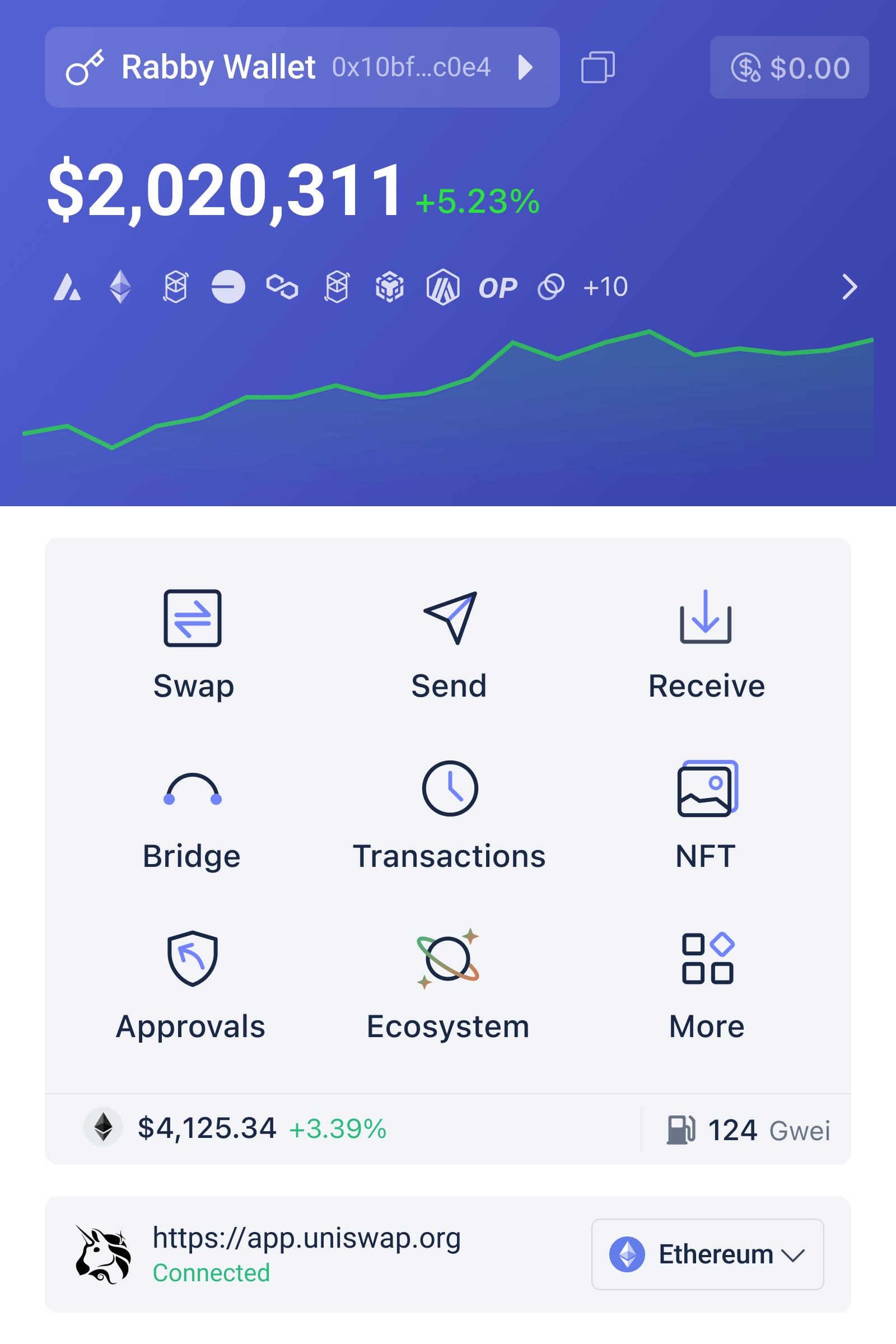
Interfaz unificada de Rabby Wallet mostrando múltiples blockchains, saldo de tokens, gestión de aprobaciones y opciones de multi-firma para coordinación de tesorería descentralizada

Rabby Wallet para DAOs: Gestión descentralizada de tesorería multi-firma y multi-cadena

Una tesorería de DAO que opera en Ethereum, Arbitrum y Polygon necesita coordinar firmas múltiples, mantener visibilidad sobre fondos fragmentados en cadenas distintas, y ejecutar transacciones que requieren aprobación colectiva sin delegar el control a intermediarios centralizados. El desafío no es técnicamente simple: cada blockchain tiene su propio modelo de transacciones, estándares de billetera multi-firma y convenciones para gestionar aprobaciones. Una herramienta que consolida esa complejidad sin sacrificar seguridad o transparencia se convierte en un componente estructural del funcionamiento diario de la organización.

Rabby Wallet, desarrollado por el equipo detrás de DeBank, aborda este escenario al proporcionar una interfaz unificada para gestionar portafolios multi-cadena, simular transacciones antes de firmarlas, y coordinar aprobaciones avanzadas. Para un equipo descentralizado que maneja tesorería compartida, esto significa reducir fricción operativa, minimizar riesgos de ejecución, y mantener un registro legible de quién autorizó qué y cuándo. El diseño no custodial es fundamental: la DAO no confía un tercero con las claves privadas, sino que retiene el control total del flujo de fondos mientras obtiene herramientas para hacerlo de forma más clara y eficiente.

Interfaz unificada de Rabby Wallet mostrando múltiples blockchains, saldo de tokens, gestión de aprobaciones y opciones de multi-firma para coordinación de tesorería descentralizada

Fundamentos de multi-firma en contexto de DAO

Una billetera multi-firma requiere que N de M firmantes aprueben una transacción antes de su ejecución. En lugar de un único titular que controla absolutamente los fondos, la responsabilidad se distribuye. Esto reduce el riesgo de que una sola clave comprometida permita un robo, pero introduce un nuevo problema: coordinación. Los firmantes deben recibir la propuesta, entender qué están firmando, tener acceso a las herramientas adecuadas, y ejecutar sus firmas en un orden que respete las restricciones técnicas de la cadena de bloques.

Las DAOs típicamente usan contratos inteligentes como SafeDAO o Gnosis Safe para implementar esta lógica en la cadena. El contrato almacena la lista de firmantes autorizados, mantiene un registro de transacciones pendientes, y solo ejecuta transferencias cuando se alcanza el umbral de firmas. El problema operativo es que proponer una transacción, recopilar firmas, y ejecutarla requiere visibilidad clara de lo que cada firmante está autorizando. Si el flujo de trabajo depende de comunicación fuera de la cadena—mensajes de Slack, Discord, o correo—entonces existe riesgo de confusión, suplantación, o pérdida de contexto.

Rabby Wallet aborda esto al permitir a los tesoreros ver exactamente qué cambios de estado ocurrirán cuando se ejecute una transacción. La simulación de transacciones es más que un ahorro de tiempo: es una forma de comunicación. Un firmante puede ver que una propuesta transferirá exactamente 100 USDC a una dirección, no 100 ETH a la equivocada. Este es el tipo de detalle que un Slack message pierde fácilmente. La vista simulada muestra balances antes y después, cambios en aprobaciones de tokens, y efectos en posiciones de DeFi, lo que reduce los errores costosos.

Visibilidad multi-cadena como herramienta de gobernanza

Una DAO que opera en tres cadenas tiene tres direcciones separadas, cada una con su propio saldo, composición de carteras, y transacciones pendientes. Sin una herramienta de visualización consolidada, alguien debe inspeccionar Etherscan para Ethereum, Arbiscan para Arbitrum, y PolygonScan para Polygon por separado. Esto es tedioso y propenso a omisiones. La tesorería parece fragmentada, y un miembro del equipo podría no estar consciente de que fondos destinados a una iniciativa ya fueron gastados en otra cadena.

Rabby Wallet proporciona un portfolio unificado que muestra balances de tokens y NFTs en los más de 100 blockchains EVM soportados en una sola pantalla. Para una DAO, esto significa que el tesorero o contador puede generar un estado de cuenta rápido sin escribir scripts personalizados o usar múltiples exploradores. Cuando se propone una transacción que movería fondos entre cadenas, la visualización permite verificar que la tesorería total permanecerá intacta, que los fondos están siendo asignados de acuerdo con el presupuesto aprobado, y que no hay contradicciones entre lo que diferentes personas creen que la DAO posee.

Este nivel de transparencia internal se convierte en un freno contra malversación o errores administrativos. Si el tesorero propone transferir 50 ETH pero el portfolio combinado muestra solo 40 ETH en todas las cadenas, la discrepancia es visible inmediatamente. Esto no previene falsificación de registros externos, pero hace que sea más difícil ocultar fondos faltantes dentro del flujo de trabajo normal de la organización. La claridad operativa es un componente subestimado de la seguridad organizacional.

Gestión avanzada de aprobaciones para reducir riesgos de token

Cuando una DAO interactúa con DeFi—préstamos, staking, provisión de liquidez—generalmente otorga permiso (approval) a un contrato inteligente para gastar sus tokens. Este approval es un punto de vulnerabilidad. Si el contrato es comprometido, o si la DAO revoca permisos tardíamente, los fondos podrían ser gastados sin consentimiento explícito en cada transacción. Una DAO que opera múltiples estrategias de inversión puede tener docenas de aprobaciones pendientes, cada una con niveles de exposición diferentes.

Rabby Wallet proporciona una vista de todas las aprobaciones activas y permite revocarlas desde una interfaz clara. Para una DAO, esto significa que los miembros pueden auditar regularmente qué contratos tienen permiso de gastar qué. Si una estrategia DeFi es descontinuada, la DAO puede revocar el approval sin necesidad de interactuar directamente con cada protocolo. La característica de aprobaciones ilimitadas versus aprobaciones limitadas es crítica: una DAO debería preferir dar permisos limitados (por ejemplo, “máximo 1,000 USDC por transacción”) cuando sea posible, aunque esto requiera renuevas periódicas.

El wallet también permite ver el historial de aprobaciones y entender cuáles han sido utilizadas y cuáles no. Esto ayuda a los tesoreros a identificar contratos que pueden ser removidos del flujo de trabajo de la DAO sin interrumpir operaciones. Una DAO que practica higiene regular de aprobaciones reduce la superficie de ataque y mejora su postura de seguridad de forma medible. Esto no es una característica gloriosa, pero es fundamental para operaciones de tesorería sostenibles.

Compatibilidad con hardware wallets y firma distribuida

Para una DAO que maneja cantidades significativas de fondos, usar únicamente billeteras de software en computadoras personales introduce riesgo. Un miembro del equipo cuya máquina está comprometida podría ser forzado a firmar una transacción no autorizada. Una hardware wallet—Ledger, Trezor, o Keystone—añade una capa de aislamiento. La clave privada nunca sale del dispositivo. El acto de firmar requiere aprobación física (a través de botones o pantalla), lo que previene que malware simplemente ejecute firmas automáticamente.

Rabby Wallet es compatible con hardware wallets principales, lo que significa que un miembro de la DAO puede conectar su Ledger, ver su saldo y transacciones pendientes en la interfaz de Rabby, y firmar transacciones multi-firma sin exponer la clave privada a la computadora. Para una DAO distribuida, esto es crítico. El tesorero en Nueva York puede firmar una transacción usando su Ledger, mientras que el contador en Singapur usa el suyo, todo dentro de la misma interfaz. El flujo de trabajo es prácticamente idéntico al de una firma centralizada, pero la seguridad es materialmente más fuerte.

Una consideración adicional es que Rabby cifra las claves privadas localmente en el dispositivo, usando las APIs de seguridad del sistema operativo (Secure Enclave en macOS, TPM en Windows). Para DAOs que aún no utilizan hardware wallets, esto proporciona una mejora de seguridad sin el costo o complejidad adicional. La arquitectura no custodial significa que Rabby nunca accede a las claves; la encriptación se realiza enteramente en el dispositivo del usuario. Una DAO puede descargar e instalar Rabby desde la rabby wallet descarga, donde encontrará versiones para Chrome, Brave, Edge y Firefox como extensión, así como aplicaciones nativas para Windows, macOS y Linux.

Flujos de trabajo de transacciones multi-firma en la práctica

Un ejemplo operativo: una DAO con 5 firmantes (3 requeridos) necesita transferir 10,000 USDC desde Ethereum a Arbitrum para financiar una iniciativa de marketing. El tesorero abre Rabby Wallet, ve la tesorería consolidada, y confirma que el USDC está en Ethereum. Propone una transacción que transferirá 10,000 USDC a una dirección de recepción en Arbitrum. Antes de hacer esto, simula la transacción y verifica que la cantidad y destino son correctos. El cambio de red es automático—Rabby detecta que la dirección destino está en Arbitrum y ajusta los parámetros de transacción automáticamente.

La propuesta se genera en el contrato multi-firma en cadena. Tres miembros del equipo reciben notificación (típicamente a través de un sistema de gobernanza como Snapshot o Discourse). Cada uno abre Rabby Wallet, ve la propuesta, y Rabby nuevamente simula la transacción para mostrar exactamente qué sucederá. El primer miembro firma usando su hardware wallet; el segundo y tercero hacen lo mismo. Una vez que se alcanza el umbral de 3 firmas, cualquier miembro puede ejecutar la transacción, que entonces se confirma en la cadena y los fondos se transfieren.

Si algo saliera mal—por ejemplo, un miembro intenta firmar pero accidentalmente envía USDT en lugar de USDC—la simulación de transacciones alertaría sobre el error antes de que la firma se registre. Esto reduce considerablemente el costo operativo de coordinar descentralización. Sin simulación clara, alguien tiene que leer el bytecode o confiar en la palabra de quien propuso la transacción. Con simulación, la verificación es visual y accesible para cualquiera, independientemente de su experiencia técnica.

Gestión de tesorería multi-token y rebalanceo de carteras

Las DAOs frecuentemente mantienen carteras diversificadas: ETH, USDC, USDT, tokens nativos de protocolos en los que participan, y a veces NFTs valiosos. Cada posición tiene un propósito diferente. ETH podría ser reserva de valor, USDC podría ser cash para gastos operativos, y tokens nativos podrían ser para staking o gobernanza. Un wallet DeFi multi-cadena debe facilitar visibilidad sobre esta complejidad sin simplificar excesivamente.

Rabby Wallet muestra cada token por separado, con saldo, precio actual (cuando está disponible), y cambio de valor en el tiempo. Para una DAO, esto permite al tesorero identificar rápidamente si el portafolio aún se alinea con la estrategia de inversión aprobada. Si la DAO decidió mantener un máximo del 30% de la tesorería en un token particular, pero ese token se ha apreciado y ahora representa el 50%, esto es visible inmediatamente. La DAO puede entonces proponer un rebalanceo: vender parte del token apreciado y comprar otro para restaurar la asignación deseada.

Este tipo de gestión de cartera no requiere conocimientos técnicos avanzados en Rabby. El wallet proporciona una interfaz clara para ver composición, comparar con objetivos, y proponer transacciones de rebalanceo. Para una DAO que opera en múltiples cadenas, poder hacer esto sin saltar entre exploradores de bloques distintos es un ahorro de tiempo considerable. La tesorería se convierte en algo que puede ser gestionado reactivamente, en lugar de reactivamente cuando surge una crisis.

Coordinación de votación y transacciones condicionales

Algunas DAOs usan transacciones condicionales o escalonadas: una propuesta de gobernanza aprueba un presupuesto, la tesorería entonces ejecuta transacciones que dependen del resultado de una votación separada. Rabby Wallet, aunque no es un protocolo de gobernanza en sí, facilita este tipo de coordinación al permitir que los tesoreros preparen transacciones en borrador, incluyan notas explicativas, y ejecuten solo cuando la aprobación es clara.

El flujo típico es: una propuesta de Snapshot o un voto en cadena se resuelve a favor de una acción. El tesorero abre Rabby, prepara la transacción que implementa esa acción, simula para confirmar que es correcta, y luego la propone formalmente en el contrato multi-firma. Los firmantes ven no solo la transacción, sino también el contexto de por qué se está ejecutando (si el tesorero incluye la referencia a la votación). Esta trazabilidad es valiosa para auditoría posterior y para mantener coherencia entre decisiones de gobernanza y acciones de tesorería.

Cuando se combinan con un registro de decisiones de gobernanza (generalmente mantenido en Snapshot, Discourse, o un documento compartido), esta documentación en cadena crea un registro auditable de cómo fluyó el capital. Una persona externa o un auditor interno pueden ver que “la votación del 15 de noviembre aprobó x gastos, y la transacción ejecutada el 16 de noviembre fue consistente con eso”. La cadena de tesorería se vuelve transparente, lo cual es un objetivo central de la gobernanza descentralizada.

Consideraciones de seguridad operativa para DAOs

Aunque Rabby Wallet proporciona herramientas para reducir riesgos, una DAO debe aún implementar procesos alrededor de esas herramientas. El simulador de transacciones previene algunos errores, pero no previene que alguien deliberadamente proponga una transacción maliciosa. El acceso a la billetera debe estar controlado por el mismo mecanismo que governa la DAO en general. Si la DAO usa Snapshot para votación, entonces el acceso a Rabby debería estar vinculado a titulares de tokens. Si usa tiering de autoridad, entonces diferentes tesoreros podrían tener diferentes permisos (por ejemplo, uno puede transferir hasta 100,000 USDC sin votación, pero debe votar para cantidades mayores).

Las DAOs también deben desarrollar procedimientos para casos de emergencia. ¿Qué sucede si una cartera de hardware se pierde? ¿Si un miembro del equipo está unavailable cuando se necesita una firma urgente? Tener respuestas a estas preguntas, documentadas y practicadas regularmente, evita que situaciones de estrés resulten en decisiones mal hechas. Algunas DAOs usan multisigs escalonadas: una multisig de “operaciones” controla fondos de corto plazo y puede ejecutar transacciones de rutina rápidamente, mientras que una multisig de “tesorería” más conservadora controla la mayoría de fondos y requiere votación formal para mover capitales.

El cifrado de claves privadas en Rabby, la simulación de transacciones, y la gestión de aprobaciones son herramientas que reducen fricción y riesgo. Pero la verdadera seguridad operativa proviene de procesos claros, distribución pensada de autoridad, y participación consistente de los miembros del equipo. Una DAO que usa Rabby Wallet sin sistemas de gobernanza claros es apenas más segura que una que usa una billetera centralizada. Una que combina herramientas fuertes con procesos sólidos construye una tesorería que puede escalar de miles a millones sin comprometer el control descentralizado.

Escalabilidad y evolución hacia ecosistemas multi-protocolo

A medida que una DAO crece, frecuentemente expande su huella tecnológica. Puede comenzar con depósitos simples en un protocolo de préstamo, pero eventualmente participa en yield farming, proporciona liquidez a múltiples DEXes, y posee posiciones en derivados. Cada nueva actividad introduce nuevos contratos inteligentes, nuevas aprobaciones, y nuevos riesgos. El soporte de Rabby para más de 100 blockchains EVM significa que la DAO puede mantener una visibilidad consolidada incluso cuando está dispersa en múltiples ecosistemas.

Para una DAO que opera en Ethereum, Arbitrum, Polygon, Optimism, y Avalanche simultáneamente, tener una sola herramienta que unifica la vista de cartera es diferente de tener que inspeccionar cinco direcciones en cinco exploradores distintos. Esto es especialmente valioso cuando la DAO necesita tomar decisiones rápido. Si un protocolo en el que la DAO mantiene posiciones es comprometido, los tesoreros deben liquidar posiciones rápidamente. Poder ver todas las carteras, simular salidas, y ejecutar transacciones multi-firma sin cambiar de herramientas acelera la respuesta y reduce el riesgo de que algo se pase por alto.

La evolución a largo plazo de una DAO también incluye cambios en estructura de gobernanza. Algunas DAOs transicionan de multisigs a contratos de gobernanza más sofisticados, o delegación de tokens. Rabby Wallet está posicionado para servir a este tipo de DAOs precisamente porque no es dogmático sobre cuál es la “forma correcta” de gobernar. Es una herramienta que funciona con cualquier arquitectura multi-firma estándar en EVM, lo que significa que la DAO puede evolucionar sin cambiar su billetera principal.

Preguntas frecuentes

¿Puede Rabby Wallet gestionar transacciones multi-firma para una DAO?

Sí. Rabby es compatible con contratos multi-firma estándar en EVM como Gnosis Safe. Permite que múltiples miembros vean, simulen y firmen transacciones coordinadas, con visibilidad consolidada de la tesorería en todas las cadenas soportadas. La simulación de transacciones antes de firmar es particularmente útil para verificar que cada miembro está autorizado correctamente.

¿Es custodial Rabby Wallet o no custodial?

Rabby es completamente no custodial. Los desarrolladores nunca acceden a las claves privadas. Las claves se cifran localmente en el dispositivo del usuario, y Rabby actúa únicamente como interfaz para interactuar con contratos inteligentes y visualizar fondos. Esto significa que la DAO retiene control total de sus fondos en todo momento.

¿Qué blockchains soporta Rabby Wallet para una DAO multi-cadena?

Rabby soporta más de 100 blockchains compatibles con EVM, incluyendo Ethereum, Arbitrum, Polygon, Optimism, Avalanche, y muchas otras. Esto permite que una DAO maneje su tesorería en múltiples cadenas desde una sola interfaz unificada, sin necesidad de cambiar entre exploradores o billeteras diferentes.

Darstellung der Hardware Wallet Integration zwischen Ledger und OKX Wallet mit physischen Sicherheitsebenen

Ledger Hardware Wallet mit OKX Wallet koppeln: Schritt-für-Schritt für physische Sicherheit

Ein Nutzer mit größeren Kryptobeständen steht vor einer praktischen Entscheidung: Seed Phrases und private Schlüssel sollten idealerweise offline auf einem Hardware-Wallet wie einem Ledger-Gerät gespeichert sein. Gleichzeitig möchte er regelmäßig mit dezentralisierten Anwendungen interagieren, ohne die Hardware-Wallet ständig an den Computer anschließen zu müssen. Die Verbindung eines Ledger-Geräts mit der OKX Web3 Wallet bietet genau diese Kombination: volle Kontrolle über die Schlüssel bleibt beim Nutzer, während die Interaktion mit DeFi-Protokollen, NFT-Marktplätzen und Blockchains komfortabel und sicher wird.

Die Hardware Wallet Integration mit OKX ist nicht nur eine Komfortfunktion. Sie reduziert das Risiko der klassischen Hot-Wallet-Probleme, bei denen private Schlüssel auf einem internetverbundenen Gerät gespeichert sind. Mit einer Ledger Hardware Wallet bleibt der eigentliche Schlüssel physisch offline. Die OKX Wallet dient als schlanke Schnittstelle, die Transaktionen vorbereitet und signiert, ohne je Zugriff auf den privaten Schlüssel zu haben. Dieser Artikel zeigt Schritt für Schritt, wie die Kopplung funktioniert, welche Sicherheitsebenen entstehen und worauf Nutzer bei der Einrichtung achten müssen.

Darstellung der Hardware Wallet Integration zwischen Ledger und OKX Wallet mit physischen Sicherheitsebenen

Warum Ledger und OKX Wallet zusammenpassen

Die Architektur einer Hardware Wallet unterscheidet sich fundamental von einer reinen Software-Wallet. Das Ledger-Gerät hat keinen Internetzugang und speichert private Schlüssel in einem physisch isolierten, gegen Ausgrabung geschützten Chip. Wenn ein Nutzer eine Transaktion signieren möchte, wird die zu signierende Information auf das Gerät übertragen, der private Schlüssel bleibt aber darin. Das signierte Ergebnis kehrt zur Wallet-Software zurück, während der Schlüssel die Hardware nie verlässt. Die OKX Web3 Wallet unterstützt diesen Workflow durch WalletConnect-Integration und dedizierte Hardware-Wallet-Modi, die genau diese Trennung bewahren.

Das Risikoprofil verschiebt sich dadurch erheblich. Eine reine Software-Wallet auf einem Smartphone oder Computer ist anfällig für Malware, die nach privaten Schlüsseln sucht. Ein Ledger-Gerät mit OKX Wallet dient stattdessen als sogenannter Signing-Server: die OKX Wallet bereitet Transaktionen vor, zeigt sie an, verwaltet Adressen und UTXOs, während der Schlüssel nur für das Signieren bemüht wird. Wenn ein Angreifer auf den Computer oder das Smartphone zugreifen würde, könnte er Transaktionen nicht ohne das physische Ledger-Gerät durchführen. Die zweite Sicherheitsschicht entsteht durch den erforderlichen PIN oder die Biometrie auf dem Ledger selbst.

Dieses Modell funktioniert über alle Blockchains, die Ledger unterstützt. Die OKX Wallet wiederum unterstützt über 130 Blockchains, darunter Bitcoin, Ethereum, Solana und Sui sowie zahlreiche Layer-2-Netzwerke. Nicht alle Kombinationen sind möglich, aber für die gängigsten Protokolle ist die Integration vollständig. Ein Nutzer kann sein Ledger mit der OKX Wallet verbinden und dadurch Transaktionen auf Ethereum, Solana oder anderen Netzwerken signieren, ohne dass der private Schlüssel die Hardware je verlässt. Die selbstverwahrte Wallet bleibt dabei vollständig unter der Kontrolle des Nutzers.

Der Konfigurationsprozess ist bewusst so gestaltet, dass Fehler schwerwiegend sind. Ein Nutzer sollte verstehen, wie die Verbindung aufgebaut wird, welche Geräte beteiligt sind und in welcher Reihenfolge die Signatur fließt. Der Austausch von Adressen, die Bestätigung auf dem Ledger-Screen und die Überprüfung vor dem Signieren sind keine optionalen Schritte. Sie sind die Kontrollpunkte, die verhindern, dass eine manipulierte Transaktion signiert wird.

Vorbereitung: Ledger-Gerät aktualisieren und OKX Wallet installieren

Vor der Integration sind mehrere Voraussetzungen zu erfüllen. Das Ledger-Gerät selbst muss mit der neuesten Firmware aktualisiert sein. Ledger stellt für diesen Prozess die Anwendung Ledger Live zur Verfügung, die auf Windows, macOS oder Linux läuft und sich direkt über USB mit dem Gerät verbindet. Nach dem Start von Ledger Live wird unter Einstellungen der Firmware-Status angezeigt. Wenn eine neuere Version verfügbar ist, kann die Aktualisierung direkt durchgeführt werden. Dieser Schritt ist essentiell, da ältere Firmware-Versionen möglicherweise nicht alle Blockchains unterstützen, die OKX benötigt.

Auf dem Computer oder Smartphone muss die OKX Web3 Wallet selbst installiert sein. Auf Smartphones ist dies die native mobile App für Android (Google Play Store) oder iOS (App Store) mit einer Installationsgröße von etwa 232 MB auf Android und 199 MB auf iOS. Für die Desktop-Nutzung stehen Browser-Erweiterungen für Chrome, Edge, Brave und Firefox bereit. Der Nutzer sollte zunächst überprüfen, dass die OKX Wallet aus einer vertrauenswürdigen Quelle installiert wird. Für die Erweiterung ist der offizielle Web Store der jeweiligen Browser zu nutzen; für die mobile App sollte nur der offizielle Store des Betriebssystems verwendet werden. Weitere Informationen und sichere Download-Links finden sich unter sites.google.com/kryptowallets.app/okx-wallet-extension-app, wo die Installation detailliert dokumentiert ist.

Ein Ledger-Gerät, das bereits mit einem Seed Phrase initialisiert wurde, kann mehrere Apps gleichzeitig mit verschiedenen Wallets verbinden. Der private Schlüssel ist derselbe, aber jede Wallet-App kommuniziert mit dem Gerät über eigene Kanäle. Wenn der Nutzer zum ersten Mal OKX mit dem Ledger verbindet, wird die Verbindung auf dem Ledger-Screen angezeigt und muss bestätigt werden. Dieser Bestätigungsprozess ist nicht optional und dient als erstes Sicherheitssignal dafür, dass das richtige Gerät mit der erwarteten Anwendung kommuniziert.

Die USB-Verbindung zwischen Ledger und Computer ist für diesen Setup-Prozess erforderlich. Das Ledger muss entsperrt sein (mit PIN oder Biometrie), und Ledger Live sollte geschlossen sein. Wenn beide Anwendungen versuchen, mit dem Gerät zu kommunizieren, kann es zu Konflikten kommen. Ein sauberer Start ist daher empfohlen: USB-Kabel anschließen, Ledger entsperren, Ledger Live schließen, dann die OKX Wallet öffnen.

Schritt-für-Schritt: Ledger mit OKX Wallet verbinden

Nachdem die Vorbereitung abgeschlossen ist, kann die aktive Verbindung hergestellt werden. In der OKX Wallet gibt es einen Menü-Punkt oder eine Schaltfläche für Hardware-Wallet-Integration. Dieser befindet sich typischerweise unter „Wallet erstellen” oder „Wallet importieren”, dann unter der Option für Hardware-Wallets. Die Wallet wird dann aufgefordert, den Typ des Hardware-Wallets auszuwählen. Hier wird „Ledger” als Option verfügbar sein. Der Nutzer wird dann aufgefordert, das Ledger-Gerät über USB anzuschließen, falls nicht bereits geschehen.

Der nächste Schritt ist die Blockchain-Auswahl. Die OKX Wallet wird anzeigen, welche Blockchains unterstützt sind. Für die meisten Nutzer ist die Auswahl von Ethereum oder Bitcoin der Startpunkt, da diese Netzwerke auf jedem Ledger verfügbar sind. Nach der Auswahl wird auf dem Ledger-Screen eine Nachricht angezeigt, die besagt, dass die OKX Wallet um Zugriff auf das Gerät anfragt. Der Nutzer muss dies auf dem Ledger-Screen mit den Tasten bestätigen. Dies ist ein kritischer Kontrollpunkt: Der Bildschirm des Ledgers ist nicht hackbar und zeigt daher zuverlässig an, welche Anwendung um Zugriff bittet.

Nach der Bestätigung wird die Wallet die verfügbaren Adressen vom Ledger abrufen. Da das Ledger-Gerät Hierarchical Deterministic (HD) Wallets unterstützt, werden mehrere Adressen angezeigt. Der Nutzer kann auswählen, welche Adresse als primäre Empfängeradresse dienen soll. Es ist möglich, mehrere Adressen zu verwenden, was Datenschutz fördert, indem verhindert wird, dass jede Transaktion zur selben öffentlichen Adresse führt. Nach der Auswahl wird die Verbindung konfiguriert und die OKX Wallet zeigt das verbundene Ledger-Gerät an. Der Nutzer sieht fortan in der Wallet, dass die Transaktionen „mit Ledger” signiert werden.

Kritisch in diesem Moment ist die Überprüfung: Die auf dem Ledger-Screen angezeigte Adresse sollte exakt mit der Adresse in der OKX Wallet übereinstimmen. Wenn ein Angreifer den Computer kompromittiert hätte und die Adressen manipuliert würde, könnte dies zu Geldverlust führen. Deshalb sollte der Nutzer die Adresse vom Ledger-Screen mit der OKX Wallet vergleichen und nur dann fortfahren, wenn beide identisch sind. Diese Verifikation kostet wenige Sekunden und schützt vor einer ganzen Klasse von Angriffen.

Transaktionsablauf mit verbundenem Ledger-Gerät

Nachdem die Verbindung erfolgreich hergestellt wurde, ändert sich der Transaktionsablauf. Wenn der Nutzer nun eine Transaktion einleiten möchte, wird die OKX Wallet die Transaktionsdetails vorbereiten und anzeigen: Empfängeradresse, Betrag, geschätzte Netzwerkgebühren und andere Parameter. Dies geschieht auf dem Bildschirm des Computers oder Smartphones. Der Nutzer kann alle Details überprüfen, bevor etwas auf dem Ledger geschieht. Dieser Schritt ist ausschlaggebend und sollte nicht übersprungen werden, da hier Fehler wie falsche Adressen oder unerwartete Gebühren erkannt werden.

Erst nach dieser Überprüfung wird die OKX Wallet eine Signaturanfrage an das Ledger-Gerät senden. Das Gerät zeigt dann seinerseits die Transaktionsinformation an, allerdings in einem komprimierten Format, das auf den kleinen Bildschirm passt. Der Nutzer wird aufgefordert, die Transaktion auf dem Ledger nochmals zu verifizieren. Dies ist die zweite Kontrollschicht: Sollte die OKX Wallet manipuliert worden sein und andere Daten an das Ledger senden als angezeigt, wird der Nutzer auf dem Ledger-Screen eine Diskrepanz bemerken. Nur wenn beide Bildschirme konsistent sind, sollte der Nutzer mit den Ledger-Tasten bestätigen.

Nach der Bestätigung auf dem Ledger wird die Transaktion auf dem Gerät signiert. Der private Schlüssel wird zu keinem Zeitpunkt übertragen. Das Ledger-Gerät erzeugt eine kryptographische Signatur basierend auf der Transaktion und seinen internen Schlüssel und sendet nur diese Signatur zurück. Die OKX Wallet nimmt die Signatur und sendet die nun signierte Transaktion an das entsprechende Blockchain-Netzwerk. Der Prozess ist abgeschlossen, ohne dass der private Schlüssel je die Hardware verlassen hat. Dies ist die Kerngarantie einer Hardware Wallet Integration.

Im Fall von Ethereum oder anderen Smart-Contract-Blockchains kann die Transaktion auch das Genehmigen (Approving) eines Tokens für einen Smart Contract umfassen. Hier wird die OKX Wallet zunächst eine Approval-Transaktion vorschlagen, die auf dem Ledger signiert werden muss. Danach erfolgt die eigentliche Transaktion. Auf den ersten Blick mag dies als Umstand erscheinen, ist aber in Wirklichkeit eine Sicherheitsfeature: Der Smart Contract erhält nur die minimale Berechtigung, die für die Transaktion notwendig ist, nicht einen pauschalen Blanko-Scheck.

Sicherheitsmodell und Risikogrenzen verstehen

Eine Ledger Hardware Wallet mit OKX Wallet verbessert das Sicherheitsprofil erheblich, hebt aber nicht alle Risiken auf. Der private Schlüssel bleibt offline und sicher, solange das Ledger-Gerät physisch geschützt ist. Jedoch ist der PIN auf dem Ledger selbst ein Angriffsvektor. Ein Angreifer, der das physische Gerät hat und die PIN errät, könnte potentiell auf die Schlüssel zugreifen. Moderne Ledger-Geräte limitieren PIN-Versuche und machen Brute-Force-Anschläge praktisch unmöglich, aber ein schwacher PIN (z.B. „0000″) ist ein menschliches Risiko, das das technische Design nicht aufhebt.

Ein zweites Risiko besteht in der Seed Phrase, mit der das Ledger-Gerät ursprünglich initialisiert wurde. Falls diese Seed Phrase kompromittiert ist, kann ein Angreifer, der Zugriff auf sie hat, eine identische Wallet auf einem anderen Gerät oder in einer Software-Wallet rekonstruieren. Die Ledger-Technologie speichert die Seed Phrase während der Initialisierung auf dem Gerät und niemals anderswo, aber der Nutzer erhält eine physische Kopie dieser Phrase, um Verluste zu verhindern. Diese physische Kopie muss entsprechend geschützt sein: nicht fotografiert, nicht in Cloud-Speichern, nicht auf Post-it-Zetteln. Viele Sicherheitsverletzungen entstehen nicht durch Geräteausfälle, sondern durch schlecht geschützte Backups.

Ein drittes Risiko liegt in der OKX Wallet selbst auf dem Computer oder Smartphone. Falls das Gerät mit Malware infiziert ist, könnten Adressen manipuliert werden, sodass der Nutzer unwissentlich an einen Angreifer sendet statt an den beabsichtigten Empfänger. Das Ledger schützt hier nur insofern, als es keine privaten Schlüssel auf dem Gerät gibt. Die Überprüfung auf dem Ledger-Screen ist die einzige Verteidigungslinie gegen diese Art von Angriff. Deshalb ist die Konsistenzprüfung zwischen dem OKX-Screen und dem Ledger-Screen nicht optional. Ein Nutzer, der diese Überprüfung überspringt, weil es Zeitdruck gibt, riskiert genau den Schaden, den das Hardware-Wallet vermeiden soll.

Ein viertes Risiko ist ein weniger bekanntes: Die Firmware des Ledger-Geräts selbst könnte theoretisch kompromittiert sein, wenn es nicht aus einer vertrauenswürdigen Quelle stammt. Ein nicht autoriserter Ledger könnte mit modifizierter Firmware vorgeladen sein. Der Kauf eines echten Ledger-Geräts nur von autorisierten Händlern (Ledger.com direkt oder zertifizierte Wiederverkäufer) ist daher wichtig. Besitzer von älteren Ledger-Geräten können die Firmware-Version in Ledger Live überprüfen und updaten, wenn nötig. Dies ist ein einmaliger Aufwand, der bestätigt, dass das Gerät noch die von Ledger verteilte Software läuft.

Multichain-Management mit einem Ledger-Gerät

Das Ledger-Gerät selbst ist multichain-fähig. Ein einzelnes Geräte kann Bitcoin, Ethereum, Solana, Cardano und Dutzende andere Blockchains gleichzeitig verwalten, alle mit dem gleichen privaten Schlüssel (oder genauer gesagt, von einem Seed Phrase abgeleiteten Schlüsseln). Die OKX Wallet unterstützt über 130 Blockchains, darunter Bitcoin, Ethereum, Solana und Sui sowie zahlreiche Layer-2-Netzwerke. Nicht jede Blockchain ist auf dem Ledger verfügbar, aber für die gängigsten Protokolle ist es der Fall.

Dies eröffnet einen Workflow, der sehr bequem ist: Der Nutzer kann in der OKX Wallet zwischen verschiedenen Blockchains wechseln und auf jeder mit dem gleichen Ledger-Gerät signieren. Eine Bitcoin-Transaktion, eine Ethereum-Smart-Contract-Interaktion und eine Solana-Überweisung können alle mit dem gleichen Hardware-Wallet erfolgen, ohne das Gerät zu wechseln oder neu zu konfigurieren. Die OKX Wallet verwaltet automatisch, welcher Schlüssel auf welcher Blockchain zu welcher Adresse gehört.

Das Risikoprofil hier ist ein klassischer Trade-off: Bequemlichkeit gegen Segmentierung. Ein Nutzer mit sehr hohem Wert könnte es bevorzugen, separate Hardware-Wallets für Bitcoin (wo ein stabiles Netzwerk und langfristige Speicherung kritisch sind) und Ethereum (wo häufige DeFi-Interaktionen erforderlich sind) zu halten. Für einen Durchschnittsnutzer ist ein Ledger-Gerät mit mehreren Blockchains sehr praktisch. Die OKX Wallet ermöglicht es, mehrere Ledger-Geräte gleichzeitig zu verbinden, falls Segmentierung gewünscht ist. Hier sollte der Nutzer der Risikobereitschaft entsprechend entscheiden.

Es ist auch möglich, mit dem gleichen Ledger-Gerät mehrere Wallets zu verwenden. Theoretisch könnte ein Nutzer sein Ledger mit OKX verbinden und gleichzeitig mit MetaMask verbinden (sofern MetaMask Hardware-Wallet-Unterstützung bietet). Dies erzeugt jedoch Komplexität: Jede Wallet hat potenziell ein anderes View auf die Adressen und Transaktionen. Für Anfänger ist es empfohlen, mit einer Wallet-Software zu beginnen und diese nicht zu wechseln, bis das Vertrauen und Verständnis gefestigt sind. Die OKX Wallet mit ihrer Ledger Integration bietet eine solide Basis, um die Hardware-Sicherheit mit der Bequemlichkeit einer modernen Oberfläche zu kombinieren.

Wartung und Backup-Strategien

Ein Hardware-Wallet, das mit OKX verbunden ist, erfordert regelmäßige Wartung. Die Ledger-Firmware sollte aktualisiert werden, wenn Sicherheits-Updates verfügbar sind. Dies geschieht über Ledger Live und dauert nur wenige Minuten. Es ist ratsam, alle 6 bis 12 Monate zu überprüfen, ob eine neue Firmware verfügbar ist. Ebenso sollte die OKX Wallet auf dem Computer oder Smartphone regelmäßig aktualisiert werden. Sicherheits-Patches und Verbesserungen werden kontinuierlich veröffentlicht, und ein Nutzer, der eine veraltete Version nutzt, könnte anfällig für bekannte Sicherheitslücken sein.

Das Backup der Seed Phrase ist kritisch, aber auch eine Vertrauensfrage. Wenn das Ledger-Gerät verloren geht oder beschädigt wird, ist die Seed Phrase der einzige Weg, die Gelder zu rekonstruieren. Ein Nutzer, der eine Seed Phrase nirgends aufgezeichnet hat, hat faktisch kein Backup und riskiert den Totalverlust, wenn das Gerät ausfällt. Ein Nutzer, der die Seed Phrase unsicher aufbewahrt, riskiert, dass ein Angreifer die Phrase findet und auf einem anderen Gerät all seine Gelder abholt.

Best Practice ist daher: Die Seed Phrase wird während der Ledger-Initialisierung erzeugt. Der Nutzer schreibt sie sorgfältig auf Papier oder in ein Metallplättchen (sogenanntes Seed Storage), vorzugsweise in zwei oder mehr Kopien. Diese werden an physisch sicheren Orten aufbewahrt, z.B. in einem Safe, einem Bankschließfach oder bei einer vertrauenswürdigen Person. Die Seed Phrase sollte niemals fotografiert, in E-Mails versendet oder in digitalen Notizen gespeichert werden. Ein paranoiderer Nutzer könnte die Phrase sogar in zwei Teile aufteilen und diese an unterschiedlichen Orten aufbewahren, sodass kein einzelner Angreifer beide Teile finden kann, ohne den anderen zu sezieren.

Ein zweites Backup ist der Recovery-Prozess selbst. Mindestens einmal sollte ein Nutzer testen, dass die Seed Phrase tatsächlich funktioniert. Dies geschieht, indem ein zweites Ledger-Gerät mit der gleichen Seed Phrase initialisiert wird und überprüft wird, dass die daraus resultierenden Adressen identisch sind. Dies sollte in einem kontrollierten Umfeld erfolgen, auf keinen Fall mit Live-Geldern. Wenn ein Nutzer erst bei einem echten Notfall feststellt, dass die Seed Phrase fehlerhaft aufgezeichnet oder nicht lesbar ist, ist es zu spät. Ein erfolgreicher Recovery-Test gibt Gewissheit dafür, dass der Wiederherstellungsplan tatsächlich funktioniert.

Häufige Fallstricke und deren Vermeidung

Ein häufiger Fehler ist, das Ledger-Gerät mit mehreren OKX-Wallets auf verschiedenen Computern zu verbinden und dabei anzunehmen, dass es sich um unabhängige Wallets handelt. In Realität ist es die gleiche Wallet auf dem Ledger. Wenn ein Angreifer auf einem der Computer Zugriff erhält und die Adressen manipuliert, könnten Gelder auf den anderen Computer zum Angreifer gesendet werden. Die Lösung ist, sicherzustellen, dass jeder Computer, auf dem die OKX Wallet läuft, vertrauenswürdig und regelmäßig gescannt auf Malware ist.

Ein anderer häufiger Fehler ist, die PIN des Ledger-Geräts zu vergessen. Das Ledger speichert die PIN lokal und es gibt keine Möglichkeit, sie zurückzusetzen, ohne das Gerät mit der Seed Phrase neu zu initialisieren. Ein Nutzer, der die PIN mehrmals falsch eingibt, wird das Gerät sperren müssen. Dies ist absichtlich so gestaltet, um Brute-Force-Anschläge zu verhindern. Um diesen Fehler zu vermeiden, sollte der Nutzer die PIN an einem sicheren Ort notieren, nicht auf dem Gerät selbst oder in unverschlüsselten Dateien.

Ein drittes häufiges Problem ist Verwirrung über die Adresse. Ein Ledger-Gerät mit OKX verbunden kann mehrere Adressen pro Blockchain haben (aufgrund der HD-Wallet-Struktur). Ein Nutzer, der Gelder an die falsche Adresse sendet oder die Adresse auf dem Ledger nicht mit der OKX Wallet abgleicht, könnte Gelder an unerwartete Orte senden. Dies wird oft als „fehlende Transaktion” beschrieben, aber die Transaktion ist nicht fehlerhaft, sondern wurde an die richtige (vom Angreifer manipulierte) Adresse gesendet. Die Überprüfung ist daher unverzichtbar.

Zuletzt ist zu erwähnen, dass die OKX Wallet selbst lokale Seed Phrases speichert, falls Nutzer diese nicht nur mit Hardware-Wallets verwenden möchten. Es ist absolut notwendig, dass Nutzer sich bewusst sind, welche Wallet-Typ sie gerade einrichten: eine Hardware-Wallet (sicher, aber etwas unbequem) oder eine Software-Wallet (bequem, aber weniger sicher). Eine Verwechslung könnte dazu führen, dass private Schlüssel an den falschen Ort landen. Die OKX Wallet sollte entsprechend als „nur Hardware-Wallet-Schnittstelle” konfiguriert werden, wenn der Nutzer ausschließlich Ledger-Sicherheit benötigt.

Langfristige Strategie für sichere Selbstverwahrung

Ein Ledger-Gerät mit OKX Wallet ist langfristig eine solide Kombination, aber es erfordert Disziplin. Die Hardware-Wallet bleibt sicher, solange das Gerät physisch geschützt ist und korrekt konfiguriert wurde. Die OKX Wallet als Schnittstelle bleibt sicher, solange der Computer oder das Smartphone nicht kompromittiert ist. Die Kontinuität der Sicherheit hängt davon ab, dass beide Ebenen gepflegt werden: Firmware-Updates, Überprüfung von Adressen, sichere Seed-Phrase-Verwaltung.

Ein Nutzer mit hohem Vermögen könnte eine zusätzliche Sicherheitsebene in Betracht ziehen: ein zweites Ledger-Gerät als Backup, das an einem sicheren Ort gelagert wird und nur im Notfall aktiviert wird. Dies erfordert, dass beide Ledger-Geräte mit der gleichen Seed Phrase initialisiert werden, sodass sie auf die gleichen Gelder zugreifen können. Damit wird das Risiko verringert, dass ein Ausfallfall des primären Geräts zum Verlust führt. Es ist auch möglich, mehrere Hardware-Wallets zu verwenden und Gelder auf mehrere zu verteilen (sogenannte Multi-Sig-Setups), aber dies ist advanced und erfordert erhebliches Verständnis.

Für die Mehrheit der Nutzer ist ein einzelnes Ledger-Gerät mit der OKX Wallet eine angemessene Balance zwischen Sicherheit und Bequemlichkeit. Der Setup-Prozess ist einmalig, danach wird das Gerät zu einem zuverlässigen Werkzeug, das private Schlüssel schützt und gleichzeitig moderne Blockchain-Interaktion ermöglicht. Die Schlüsselbotschaft ist, dass Sicherheit ein Prozess ist, nicht ein Produkt. Ein Ledger-Gerät ist ein ausgezeichnetes Werkzeug, aber es kann schlecht konfiguriert, schlecht gepflegt oder schlecht genutzt werden. Der bewusste Umgang mit den hier beschriebenen Schritten und Fallstricken ist das, was aus einem teuren Hardware-Stück ein echtes Sicherheitssystem macht.

Häufig gestellte Fragen

Kann ich mein Ledger-Gerät mit mehreren Wallets gleichzeitig verbinden?

Ja, ein Ledger-Gerät kann theoretisch mit mehreren Wallet-Anwendungen verbunden werden, einschließlich OKX, MetaMask und anderen. Dies erzeugt aber Komplexität. Alle Wallets greifen auf die gleichen privaten Schlüssel zu, daher sollte ein Nutzer mit nur einer Wallet-Software beginnen, bis er vollständig versteht, wie das System funktioniert.

Was passiert, wenn ich mein Ledger-Gerät verliere?

Falls die Seed Phrase ordnungsgemäß aufgezeichnet

Phantom browser extension interface illustrating wallet access and the need to verify transaction details

Phantom on Solana: What a Browser Extension Does—and What It Cannot Protect You From

Is downloading a Phantom browser extension the same as securing your Solana assets? No. The more useful question is what the wallet actually controls, what remains your responsibility, and where convenience can quietly increase risk. Phantom is a non-custodial wallet: it gives the user control of private keys and the 12-word secret recovery phrase rather than holding funds on the user’s behalf. That architecture is powerful, but it changes the meaning of “security.” There is no central account desk that can restore a lost phrase, reverse an unauthorized signature, or freeze a mistaken transfer.

For US users, the distinction matters because a wallet is not a bank account and a browser extension is not merely a login tool. It is a signing interface connected to decentralized applications, marketplaces, staking services, and token exchanges. Phantom began as a Solana-focused wallet and now presents several networks—including Ethereum, Bitcoin, Polygon, Base, Sui, and Monad—through one interface. That expansion makes it more versatile, but it also makes chain awareness and transaction review more important.

Phantom browser extension interface illustrating wallet access and the need to verify transaction details

Myth one: the download is the security model

A common misconception is that the safest Phantom wallet download is simply the first result in a search engine. In reality, the critical security decision happens before installation: the user must verify the source, browser, publisher information, and requested permissions. Fake extensions and phishing pages can imitate familiar branding while collecting recovery phrases or redirecting users to malicious signing requests. A legitimate installation does not make an untrusted website safe, and no wallet interface can compensate for entering a recovery phrase into a page that should never have requested it.

Phantom supports desktop extensions for Chrome, Firefox, Brave, and Edge, along with mobile applications for iOS and Android. The practical rule is simple: begin from a source you independently trust, check the URL character by character, and never share the recovery phrase with support staff, websites, or anyone claiming to “validate” the wallet. The phrase is not a password that can be reset. If it is lost, funds may be permanently inaccessible; if it is exposed, an attacker may control the wallet without needing access to the original computer.

This is the first important conceptual distinction: self-custody removes intermediary control, but it also removes intermediary recovery. The same feature that prevents a third party from freezing funds means that user error becomes a direct custody risk. Hardware-wallet integration with Ledger can reduce exposure of private keys by keeping them in offline storage, although it does not eliminate phishing, malicious contract logic, or the need to inspect what is being approved.

Myth two: a transaction simulation guarantees a safe transaction

Phantom’s transaction simulation is best understood as a visual firewall, not a guarantee. Before signing, it can show which assets are expected to leave or enter the wallet. That is materially better than approving an opaque request, because it gives the user a chance to notice an unexpected token transfer or an unfamiliar action. Yet simulation depends on what the application and wallet can interpret. A user may still misunderstand token permissions, approve a deceptive marketplace interaction, or trust a website that presents a plausible but harmful request.

The safer mental model is “verify the intended outcome, then verify the transaction.” If the goal is to stake SOL, the wallet should not appear to be transferring unrelated tokens. If the goal is to purchase an NFT, the displayed payment and resulting asset should make sense. When the simulation is unclear, incomplete, or inconsistent with the user’s intention, stopping is rational. Speed is not a security metric.

Phantom’s automatic chain detection also illustrates a trade-off. Detecting the network required by a decentralized application can remove confusing manual switching, especially for users moving among Solana and other supported ecosystems. But abstraction can hide complexity. Similar-looking assets may exist on different chains, fees and transaction rules differ, and a familiar interface can create false confidence. Convenience lowers friction; lower friction can also reduce the pause in which a user notices an error.

What Phantom does well for Solana users

For a Solana user, the wallet’s value is not limited to holding SOL. In-wallet staking allows users to delegate SOL to network validators without leaving the application. That reduces operational steps, though staking still involves choices about validators, reward conditions, liquidity, and the timing of unstaking. A displayed reward is not the same as a risk-free return, and network participation should be evaluated separately from the convenience of the interface.

NFT management is another area where an integrated wallet can be useful. Phantom provides a high-resolution gallery, metadata views, marketplace listing functions, and tools for burning malicious or unwanted spam NFTs. The important boundary is that visual polish does not establish authenticity. Metadata can be misleading, assets can be unsolicited, and an NFT or message can be designed to lure a user into a harmful interaction. Burning obvious spam may reduce clutter, but interacting with unknown assets remains a security decision.

Built-in swapping can similarly simplify execution by using cross-chain routes and attempting to optimize for lower slippage, which is the difference between an expected exchange price and the final execution price. That optimization is not a promise of the best possible result in every market condition. Liquidity, route availability, network congestion, fees, and asset risk still matter. A wallet can make a trade easier to initiate without making the underlying market liquid, fair, or suitable for the user.

Privacy deserves a careful interpretation as well. Phantom prioritizes self-custodial privacy by not logging personal user data such as IP addresses, names, or email addresses. That is meaningful, but wallet privacy is not identical to transaction anonymity. Public blockchain activity can remain visible, and interactions with exchanges, websites, internet providers, or other services may create records outside the wallet. “Does not log certain personal data” should not be expanded into “all activity is untraceable.”

A practical framework for a Phantom browser extension

Before installing, confirm the browser and official distribution path. During setup, create the recovery phrase in a private environment and store it offline in a form that can survive device failure. Do not photograph it, place it in ordinary cloud storage, or paste it into a chat. After setup, consider using a small operational wallet for routine dApp activity and keeping longer-term holdings in a more protected arrangement, potentially with Ledger integration. This separation limits the consequences of one compromised website or mistaken approval.

When connecting to a decentralized application, ask three questions: Is this the site I intended to visit? Does the requested action match my goal? Can I explain every asset movement shown in the simulation? If the answer to any question is no, reject the request. Users seeking a verified starting point for learning about the phantom wallet should still independently confirm the installation destination and never treat a third-party page as proof of authenticity.

Alternatives can be reasonable depending on the use case. MetaMask is often more natural for users concentrated in EVM-based applications, while Trust Wallet emphasizes a mobile-first, broad multi-chain experience. Solflare may appeal to users who want a dedicated Solana environment. The decision should be based on chain coverage, hardware-wallet support, dApp compatibility, transaction clarity, and the user’s ability to operate the tool safely—not on the number of features displayed in a comparison table.

What to watch as Phantom becomes more multi-chain

The recent project messaging emphasizes downloads for Solana, Ethereum, Bitcoin, Base, and Sui across Chrome, Brave, Firefox, iOS, and Android. The likely implication is not that users should immediately move assets across every supported network. Rather, broader coverage increases the importance of clear network labeling, asset identification, and transaction simulation. If the unified interface continues to reduce technical friction, the central usability challenge will be making hidden differences visible at the moment they matter.

That is an open design question, not a prediction of guaranteed improvement. Multi-chain convenience may help experienced users manage several ecosystems, while newer users may interpret one interface as evidence that all chains behave alike. The strongest signal to watch is whether safety information remains understandable under pressure: during a purchase, a swap, a staking action, or a suspicious NFT interaction.

Frequently asked questions

Is Phantom a Solana-only wallet?

No. Phantom was originally developed for Solana, but it now supports a multi-chain environment that includes Ethereum, Bitcoin, Polygon, Base, Sui, and Monad. Users should still verify the network and asset before approving any transaction.

Can Phantom recover funds if the 12-word phrase is lost?

No. Phantom is non-custodial, so the user controls the recovery phrase and private keys. Losing the phrase can result in permanent loss of access. Anyone asking for it is asking for the credential that controls the wallet.

Does transaction simulation make every dApp interaction safe?

No. Simulation can clarify expected asset movements, but it cannot replace verifying the website, understanding the action, and considering malicious contract behavior or misleading interfaces.

The most accurate description of Phantom is therefore not “a secure place where crypto is stored.” It is a self-custody tool that helps a user manage keys, sign network actions, stake SOL, handle NFTs, and interact with multiple blockchains. Its usefulness depends on the quality of the interface and the quality of the user’s decisions. Downloading the correct extension is the beginning of that process, not the end.

Visual representation of event contracts used to trade views about measurable real-world outcomes

Event Trading in the US: How Kalshi Contracts Compare With Bets, Forecasts, and Hedges

What if the most important question in a prediction market is not “Who will win?” but “What, exactly, is being measured?” That distinction separates an entertaining forecast from a tradable event contract. In the US, regulated prediction markets are built around contracts whose value depends on a clearly defined real-world outcome. The appeal is obvious: instead of merely debating inflation, elections, weather, or economic releases, a participant can express a view through a market price. The complication is equally important. A price is not a pure prediction, and a contract is not automatically a good hedge, investment, or source of truth.

Kalshi describes itself as a regulated exchange and prediction market where users can buy and sell Event Contracts tied to real-world events. That framework gives event trading a different structure from informal forecasting and from conventional casino-style wagering. The central task is to understand the contract’s rules, the incentives of other participants, the cost of trading, and the process used to determine the final outcome. A confident opinion is only the starting point.

Visual representation of event contracts used to trade views about measurable real-world outcomes

What an event contract actually does

An event contract is a contingent claim: its settlement depends on whether a specified condition occurs. A simple “yes” or “no” contract may trade at a price that market participants interpret as an approximate probability, often on a scale where a higher price signals greater confidence that the event will happen. But that interpretation has limits. The price also reflects liquidity, fees, risk tolerance, urgency, and the possibility that traders disagree about the wording or settlement process.

This is the first useful mental model: a market price is a compressed record of expectations and trading pressure, not a crystal ball. If a contract is thinly traded, one motivated participant may move the price substantially. If the event is difficult to define, traders may be pricing ambiguity as much as they are pricing the underlying outcome. Even a liquid market can be wrong when information is incomplete or when participants share the same mistaken assumption.

That is why contract specifications matter more than a dramatic headline. Readers considering a kalshi official site should examine the event definition, end date, source of the official determination, settlement timing, trading fees, and any limits that affect execution. “Will inflation rise?” is not a sufficiently precise contract. “Will a named measure reach a stated threshold during a defined period, according to a specified release?” is closer to something that can be evaluated consistently.

Three ways to express a view about the future

Event contracts versus conventional betting

The most familiar comparison is sports or casino betting. Both activities involve uncertain outcomes and the possibility of financial gain or loss, but the economic design can differ. In a conventional wager, the operator commonly sets the odds and manages its exposure. In an exchange-style event market, participants trade against one another, and the displayed price can change as orders arrive and information develops.

That does not make event trading risk-free or automatically superior. Exchange trading can offer a more visible price-discovery process, while conventional betting may be easier to understand for a single contest. Event contracts also cover questions outside sport, including measurable economic or public events, but those markets can be harder to interpret because the outcome may depend on technical definitions and official data revisions. The best fit depends on whether the user wants entertainment, a directional view, or a more disciplined way to manage exposure.

Event contracts versus polls and forecasts

Polls and expert forecasts answer a different question. A poll attempts to measure what a group currently believes or intends to do. A forecast expresses an analyst’s estimate, sometimes with a stated probability. An event market adds a financial incentive: participants risk capital when they trade. That incentive may encourage research and rapid incorporation of news, but it does not guarantee superior judgment.

Markets can aggregate dispersed information efficiently when many informed participants can trade at reasonable cost. They can also amplify shared narratives. A sudden price move may represent new evidence, a temporary liquidity imbalance, or simple imitation. Treating the market as one more input—alongside primary data, methodology, and historical context—is usually more defensible than treating it as an oracle.

Event contracts versus traditional financial hedges

A hedge is designed to reduce the impact of an adverse change in an exposure. An event contract may help with that task only when its settlement closely tracks the risk being hedged. A business concerned about a particular economic threshold, for example, might find a related contract conceptually useful. But a broad headline indicator may not offset the company’s actual revenue, financing, or supply-chain risk.

This creates a subtle trade-off. A contract can be easy to trade yet a poor hedge because correlation is imperfect. Conversely, a contract may express a view clearly but provide little protection against the specific loss that matters. Before calling an event position a hedge, a user should identify the exposure, estimate how the contract responds to the same shock, and ask what happens if the relationship breaks down.

Why regulated access matters—and what it does not solve

For US users, a regulated venue can provide a more formal operating framework than an anonymous or offshore market. Identity checks, account controls, defined contract rules, and stated settlement procedures can make the environment easier to evaluate. A user looking up “Kalshi login” should think of account access as the beginning of due diligence, not the end of it. Verification and platform access do not remove market risk, misunderstanding, or the possibility of an unfavorable price.

Regulation also has boundaries. It may address how a venue operates, but it cannot make an uncertain event predictable. Nor does it eliminate every debate about which events should be tradable, how contracts should be classified, or whether market incentives might encourage distorted attention. The regulatory status of a platform should therefore be treated as one part of the risk assessment rather than a blanket quality seal for every contract.

Operational details deserve practical attention. Users should confirm what happens when an official source revises data, when an event is postponed, or when the wording admits multiple interpretations. They should understand whether they can exit before settlement and what the spread between buying and selling implies for the effective cost. A position that appears inexpensive in isolation can become costly when repeated trading, fees, and poor liquidity are included.

A reusable framework for evaluating a market

A disciplined review can be organized around four questions. First, what is the exact claim being settled? Second, what information could change the probability before settlement? Third, who is likely to be on the other side, and why might they have a different view? Fourth, what is the maximum acceptable loss if the thesis is wrong or the contract behaves differently than expected?

The second question is often neglected. Event trading is not only about the final outcome; it is also about the path to that outcome. A trader may be correct about the eventual result and still lose money by entering at an unfavorable price or exiting during a temporary panic. This is a key difference between being right and trading well. Timing, liquidity, and execution can matter as much as the forecast itself.

Position sizing is the practical expression of uncertainty. If the evidence is weak, the contract is ambiguous, or the market is thin, a smaller position may be rational even when the potential payoff looks attractive. Conversely, a highly confident narrative should not justify unlimited exposure. The relevant question is not “How likely is this?” in isolation, but “How much could I lose if my probability estimate, timing, or interpretation is wrong?”

What to watch as event trading develops

The recent description of Kalshi as a regulated exchange for trading the future points toward a broader question: can event markets become useful information infrastructure as well as trading venues? If more participants arrive, contract design and settlement transparency will become increasingly important. More activity could improve price discovery, but only if liquidity is distributed across well-defined markets rather than concentrated in a handful of popular questions.

A conditional scenario is more useful than a prediction here. If contracts become clearer, markets deepen, and users learn to distinguish probability from price, event trading could offer a valuable real-time measure of collective expectations. If participation grows faster than understanding, the opposite risk is plausible: catchy prices may receive more attention than carefully specified contracts, creating false precision. The signal to monitor is not simply trading volume. It is whether prices remain interpretable when the underlying event is complex, revised, or politically contested.

For readers in the US, the sensible conclusion is neither enthusiasm nor dismissal. Regulated prediction markets occupy a middle ground between a forecast, a wager, and a financial hedge. Their value comes from making beliefs explicit and tradable; their danger comes from making uncertain judgments feel more precise than they are. Use the contract language as the foundation, treat price as evidence rather than fact, and let risk controls—not excitement—determine the size of any position.

FAQ: US prediction markets and Kalshi login

Is a prediction-market price the same as a probability?

No. It may be interpreted as a market-implied probability, but the price also reflects liquidity, fees, trading pressure, and disagreement about the event. Thin markets can be especially misleading, so the number should be treated as an estimate produced by trading rather than an objective forecast.

What should I check before completing a Kalshi login and trading?

Review the account requirements, contract wording, settlement source, timing, fees, liquidity, and maximum possible loss. Also ask whether the contract matches the risk or question you actually care about. Account access makes trading possible; it does not make a position suitable or profitable.

Can an event contract be used as a hedge?

Sometimes, but only when the contract’s settlement is sufficiently connected to the exposure being managed. A broad economic or public indicator may move differently from a particular household, portfolio, or business risk. Correlation should be examined rather than assumed.

Ledger hardware wallet illustrating offline private-key protection and on-device transaction approval

Ledger Device, Ledger Live Desktop, and the Real Meaning of Crypto Security

A common misconception is that a hardware wallet makes cryptocurrency safe simply because it is a physical object. The more accurate view is less comforting and more useful: a Ledger device changes where critical decisions happen and reduces some categories of attack, but it does not remove the need for careful software, accurate transaction review, and disciplined recovery practices. The device is a security boundary, not a force field.

That distinction matters for a US crypto user installing Ledger Live on a desktop or pairing a Ledger wallet with a mobile app. The application is the dashboard through which balances, accounts, portfolio activity, and supported Web3 connections become practical to manage. The device, meanwhile, is designed to keep private keys and transaction approval under hardware control. Understanding how those roles fit together is more valuable than memorizing a list of features.

Ledger hardware wallet illustrating offline private-key protection and on-device transaction approval

The Case: A Routine Transfer That Tests the Whole System

Imagine a user who buys crypto through a US exchange, moves it to a Ledger device, and later connects Ledger Live desktop to monitor the account. The first transfer appears straightforward. The user installs the application, initializes the device, writes down the recovery phrase, and sends funds to an address displayed by the wallet interface. Yet several distinct security questions are hidden inside that routine.

Was the application obtained from a trustworthy source? Was the receiving address checked on the device screen rather than accepted only from the computer? Is the recovery phrase stored offline, away from cloud notes, phone photographs, and email? Does the user understand that a blockchain transaction is generally irreversible once confirmed? A hardware wallet helps with some of these questions, especially private-key exposure and final approval, but it cannot answer all of them on the user’s behalf.

This is the central mental model: Ledger Live is the management layer, while the Ledger device is the authorization layer. The desktop or mobile application can display balances, prepare transactions, and connect to services. The hardware device is intended to hold the private keys and require physical confirmation for important actions. If malware alters what appears on a computer, the device screen becomes a second place to inspect the destination and amount. That independent check is often the most important practical habit in the entire workflow.

What Ledger Live Desktop Actually Does

Ledger Live desktop is not a vault in itself. It is better understood as an interface that helps the user interact with networks while the device protects the credentials used to authorize transactions. This separation improves usability: a person can review portfolio information and manage supported accounts without exposing the private keys to the computer in the same way a software-only wallet might.

Installation should therefore be treated as part of the security process, not as a casual download. Users should verify that the application comes from an official and trusted distribution path, avoid sponsored search results or unsolicited messages, and be suspicious of any program that asks for a recovery phrase during ordinary setup. A genuine support interaction should never require a user to disclose that phrase. Anyone who obtains it may be able to recreate the wallet elsewhere.

After installation, pairing the device usually involves connecting it, unlocking it with its PIN, and following the application’s setup flow. The recovery phrase deserves special attention. It is not a password reset code stored by a company; it is the backup material from which wallet access can be restored. A secure backup is written carefully, kept private, and protected from fire, theft, casual discovery, and digital copying. The trade-off is inconvenient but fundamental: greater self-custody means greater personal responsibility.

For readers checking the installation path and basic setup sequence, the relevant Ledger Live desktop and mobile download information is available here. The link should be only one part of the process. Before moving meaningful funds, a prudent user can create a small test transaction, confirm the address on the device itself, and wait for the network status to update before attempting a larger transfer.

Ledger Crypto Security Compared With Other Approaches

A software wallet is often the simplest alternative. It can be convenient for small balances, frequent payments, and applications that require rapid signing. Its weakness is that the private keys live in an environment exposed to the phone or computer’s broader security condition. A malicious extension, compromised operating system, or deceptive application may create opportunities for theft. The convenience is real, but so is the larger attack surface.

Keeping assets on an exchange offers another trade-off. The exchange may provide familiar account recovery, customer support, and an easy interface, which can be valuable for active trading. But the user depends on the platform’s custody, internal controls, withdrawal policies, and account-security measures. This arrangement exchanges personal key management for counterparty and account-access risk. It may fit trading capital, but it is not equivalent to direct control of private keys.

A hardware wallet generally sits between those choices. It adds friction through a physical device, PIN management, recovery-phrase custody, and explicit approval steps. That friction can be annoying for frequent low-value actions, yet it is precisely what makes impulsive or invisible signing harder. For long-term holdings or funds that do not need constant movement, the extra step may be a reasonable security investment. For every user, however, the outcome still depends on operational discipline.

There is also a subtle limitation when using decentralized applications. Connecting a Ledger device to a dApp does not automatically make the dApp trustworthy. A user can still approve a harmful allowance, sign a malicious message, or misunderstand what a contract interaction will do. The device confirms the request presented to it; it does not independently judge the economic purpose of every smart contract. Hardware protection is strongest when the user understands what is being authorized.

Desktop or Mobile: Choosing the Right Control Surface

Desktop Ledger Live can be preferable when a user wants a larger screen, clearer transaction details, and a more deliberate environment for account management. A computer may also be easier for organizing records and reviewing addresses. Its limitation is that computers tend to have many installed applications, browser extensions, and user accounts, so the surrounding system must be kept updated and treated as potentially fallible.

Mobile management can be more convenient for checking balances, receiving funds, or handling activity away from home. That convenience comes with a smaller display and a device that may be lost, stolen, shared, or exposed to malicious apps. The same rule applies in both settings: do not rely solely on the application’s display when approving a sensitive transaction. Compare the critical details with the hardware device, where possible, and pause when the two views do not match.

The recent Ledger messaging around pairing a Ledger crypto wallet with its wallet application emphasizes portfolio management and access to dApps and Web3 services. That direction reflects a practical reality: users want one interface for more than passive storage. It also raises the importance of separating “can connect” from “should approve.” Broader Web3 access can improve usefulness, but it increases the number of permissions, contracts, and signing prompts a user must understand.

A Practical Framework for Safer Self-Custody

Think in three layers. First is the device layer: protect the hardware, PIN, and recovery phrase. Second is the software layer: install legitimate applications, update carefully, and treat unexpected prompts as potential phishing. Third is the decision layer: verify addresses, amounts, network choices, contract permissions, and the purpose of every signature. Weakness in any one layer can undermine the others.

One useful rule is to match the security procedure to the consequence of failure. A small test transfer may justify a quick but still careful review. A life-changing amount should justify independent address verification, a clean installation environment, a documented recovery plan, and perhaps a second person reviewing the process without ever seeing the recovery phrase. There is no universal “safe amount”; the right standard depends on what loss would mean to the individual.

Another boundary condition is recovery. If the device breaks, the blockchain funds are not necessarily lost when the recovery phrase is correctly preserved. Conversely, a functioning device does not protect funds if the recovery phrase has been photographed, typed into a website, or handed to a fake support agent. This is why the phrase should be treated as the root credential, not as an accessory included with the product.

Looking ahead, the important signal is not simply whether Ledger Live supports more services. The more consequential question is whether interfaces can make complex signing decisions understandable without encouraging careless approval. If Web3 tools become easier to access, users will need better transaction simulation, clearer permission explanations, and stronger habits around revoking unnecessary access. Until those safeguards are universal, convenience should be viewed as an increase in capability—and potentially in responsibility.

Frequently Asked Questions

Is Ledger Live desktop the same thing as a Ledger hardware wallet?

No. Ledger Live is an application for viewing accounts, preparing transactions, and interacting with supported services. The hardware wallet is the physical authorization device intended to protect private keys and require approval for transactions. They work together, but they are not interchangeable.

Should I ever enter my recovery phrase into Ledger Live or a support website?

No. A recovery phrase should not be entered into an ordinary setup screen, website, message, or support chat. Treat any request for it as a serious warning sign. Keep the phrase offline and private, because possession of it may allow someone else to restore and control the wallet.

Does a Ledger device make dApps and DeFi transactions safe?

It can protect the key used to sign, but it cannot guarantee that a dApp, token approval, or smart contract is legitimate. Review the transaction on the device, understand the permission being granted, and avoid signing requests that you cannot explain in plain language.

What is the safest first transaction after setup?

A small test transaction is usually a sensible starting point. Confirm the receiving address on the hardware device, verify the network, wait for confirmation, and only then consider moving a larger amount. This tests the setup while limiting the cost of an avoidable mistake.